Last updated on
Cursor Router: does it actually save money?
Key takeaways
- Cursor Router is the classifier behind Auto in Cursor’s model picker. It decides which model handles each request instead of you choosing one.
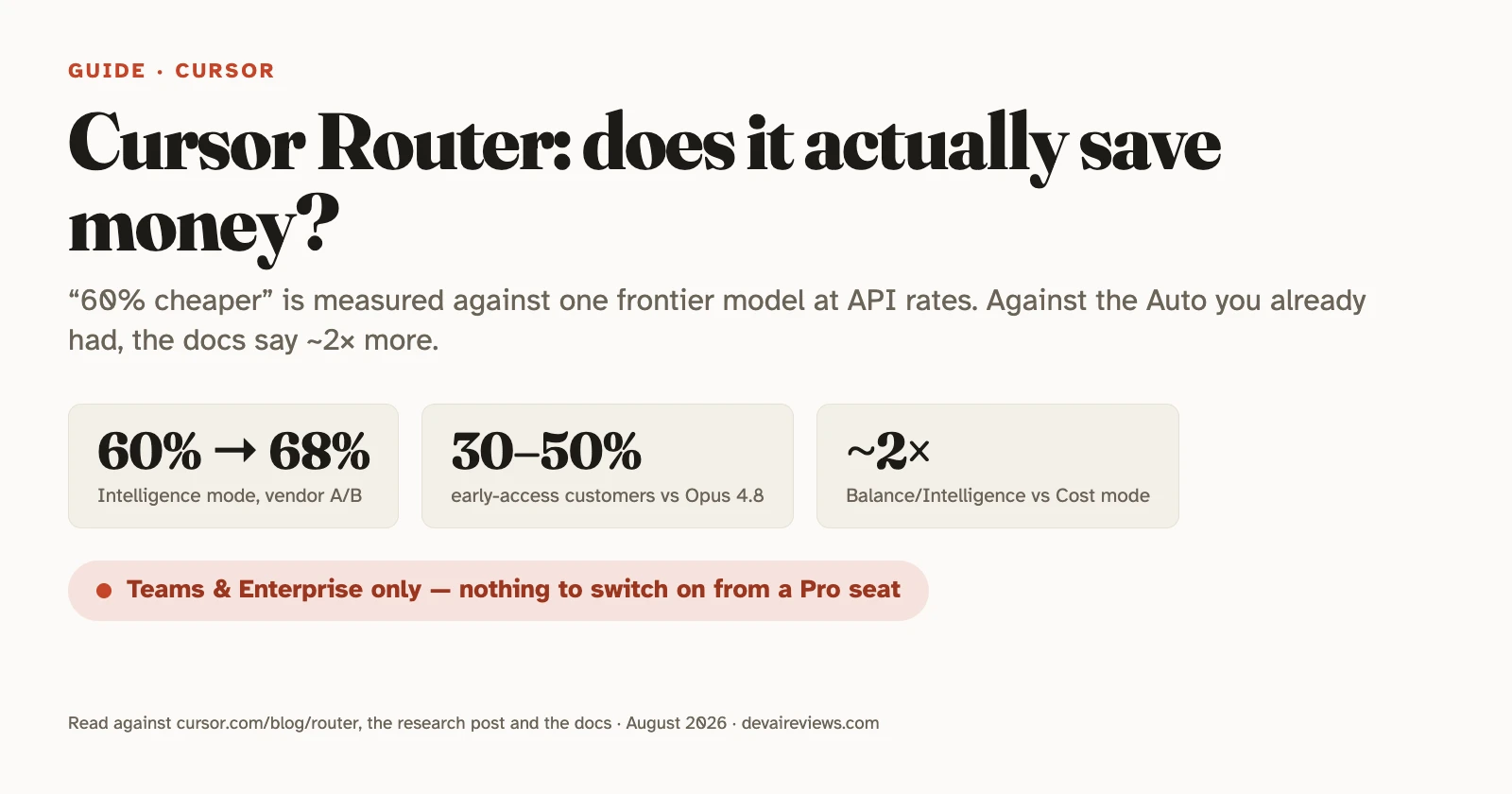
- The “60% lower cost” claim is real, but measured against a setup almost no team runs: everything on a single frontier model at API rates — Opus 4.8 in the customer numbers, Fable 5 for the satisfaction bar.
- Against the Auto mode teams already had, Cursor’s own docs put the two new Router modes at about twice the cost. That is the comparison that matches how most teams were actually working.
- It’s Teams and Enterprise only. On a Pro seat there is nothing to turn on.
What Cursor Router is
Cursor Router is a request classifier that picks a model for each turn in the agent instead of using the one you selected. Cursor launched it on July 22, 2026 for Teams and Enterprise, and describes it in the docs as “the model routing system behind Auto.” Auto isn’t new. What’s new is that Auto now has three modes under an “Optimize For” picker:
- Cost keeps the previous Auto routing logic and its bundled per-token pricing.
- Balance optimizes for “intelligence, speed, and cost.”
- Intelligence routes hard tasks to the most capable models, “at a lower cost than running a single frontier model.”
You can’t pick which model handles a given request. Cursor manages the pool, adds models as they ship (Opus 5 was added after launch, per the research post), and you steer only by mode. On Enterprise, the router respects your model allow-list, with one hard dependency: Cursor Grok 4.5 must be enabled, because it’s the price-efficient model the router falls back to when a turn doesn’t justify a frontier call. Block it and the router can stop working.
How does Cursor Router pick a model?
Cursor Router picks in two stages, both trained on live Cursor traffic rather than benchmarks. First, a complexity predictor Cursor calls Compass scores each turn from 0 to 1 by predicting whether the user will be satisfied with the response; a high score means the turn looks easy. Turns at or above a threshold stay on the price-efficient model (Grok 4.5). Cursor’s own validation: turns Compass rated as easiest got a positive satisfaction signal 96% of the time, the hardest 70.7%.
Second, turns below the threshold go to a task router that classifies them by domain (backend, database, frontend), task (fix a bug, run a command, write tests) and modifiers (bounded edit, visual-heavy change), then picks the frontier model with the best observed record on that label. A candidate model only becomes eligible if it clears “a one-sided 75% uplift threshold against the price-efficient model.” Cursor’s published read on model strengths is specific: Grok for routine work like Git commands, GPT-5.6 Sol for planning and codebase comprehension, Opus for devops and performance work, Fable for debugging and visual implementation.
The “satisfaction” signal is behavioral, not a survey: moving on to the next task counts as positive, correcting the agent counts as negative. Cursor also tracks keep rate, how much generated code survives in the repo.
What are the savings measured against?
The baseline shifts depending on which Cursor number you’re reading, and that’s the part the coverage skips. The customer numbers are explicitly “the same traffic, priced entirely at Opus 4.8 API rates.” The Intelligence-mode headline compares satisfaction to Fable 5, Cursor’s most expensive model, and the research post’s chart labels every cost figure “relative to Opus 4.8.” Either way it’s a single-frontier-model baseline. Figures below were checked on August 18, 2026.
- Launch post, online A/B across “millions of requests”: Intelligence lands near Fable 5 on satisfaction “at about 60% lower cost.” Balance beats Opus 4.8 on satisfaction “at about 36% lower cost.”
- Launch post, early access: three high-volume enterprise accounts, two weeks, “saved 30%–50% on Auto-routed requests versus routing everything to Opus 4.8.”
- Research post, published later with re-tuned modes: Intelligence “above Fable-level user satisfaction at 68% lower cost”; Balance “outperforms Opus 4.8 at 41% lower cost.”
- Cost per commit: $4.63 on Balance and $6.76 on Intelligence, against $7.34 for Opus 4.8 and $12.69 for Fable 5.
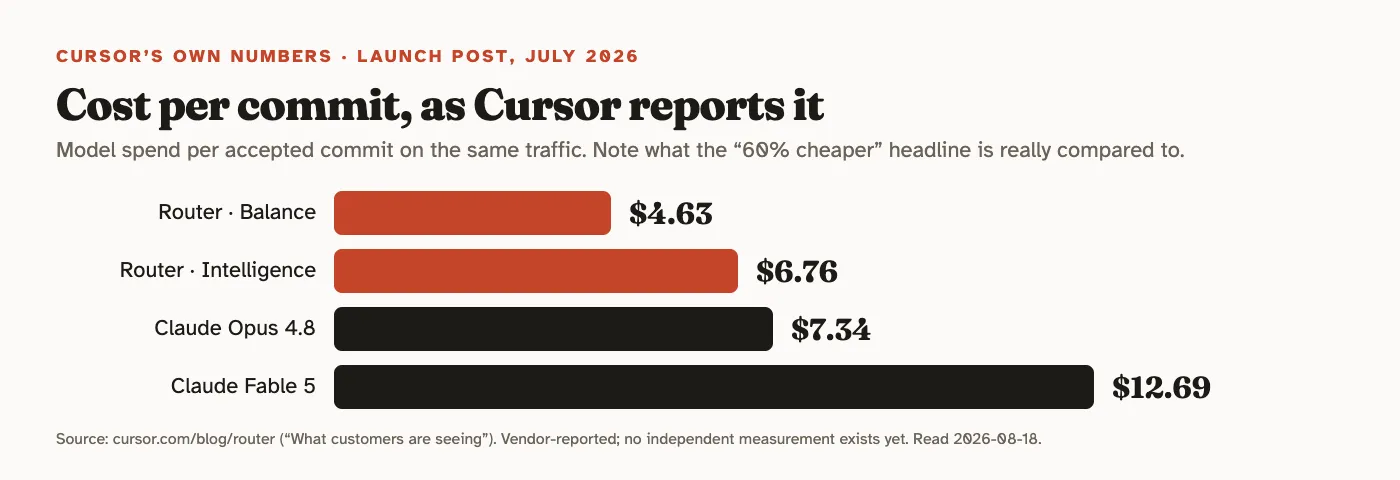
Two things about that baseline. First, it’s a defensible one for the question Cursor is answering, which is “what does frontier-only usage cost versus routed usage.” Cursor says roughly 60% of its users pick one model and stick with it, and if that model is Opus or Fable the comparison is fair. Second, it’s a generous one for a marketing number: the bigger the headline discount, the pricier the model it’s measured against. A team that already lives on Auto, or on Sol, or on Composer, was never paying Opus rates in the first place, and Cursor’s per-commit chart shows Sol matching Intelligence mode’s cost, though Cursor adds that Sol scored lower on user satisfaction.
To Cursor’s credit, the cost figures include cache misses. Switching models mid-conversation throws away the provider’s prompt cache, and the launch post says the router “is trained on a dataset where routing results in cache misses, and evaluated in production where our reported cost savings include the cost of cache misses.” Most homegrown routing setups don’t account for that. It’s the strongest part of the methodology.
Cache handling isn’t automatically a weak spot in third-party routing, though. We went looking for exactly that failure in a proxy that fronts Codex CLI and Claude Code, and found four cache_control breakpoints intact on the wire — placed in order of stability, with Anthropic’s four-breakpoint ceiling and its TTL ordering rule both respected.
Does Cursor Router make Auto cheaper?
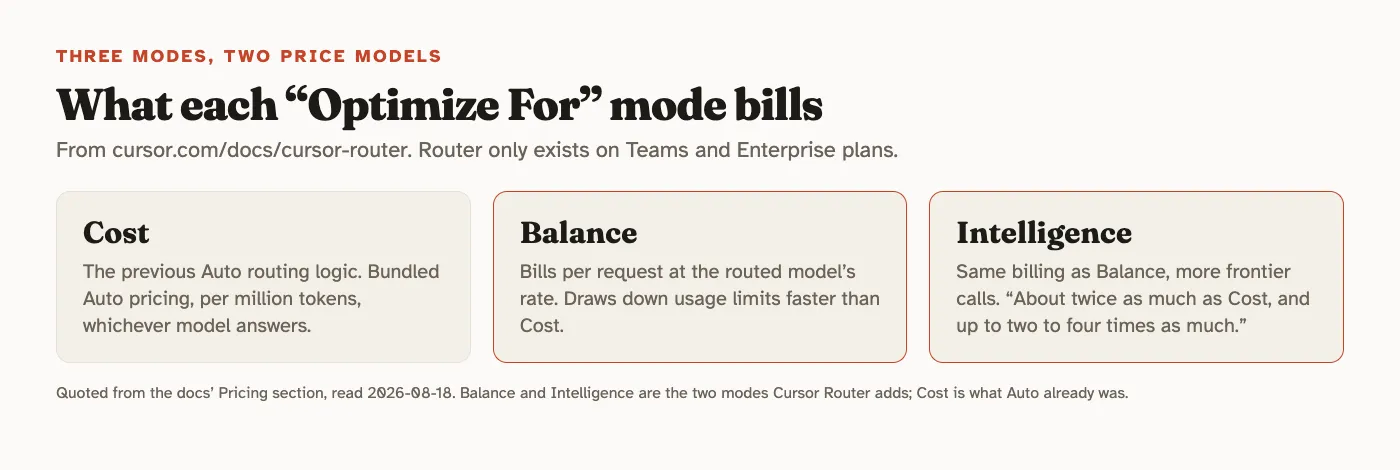
The docs page has a pricing section the blog posts don’t. Cost mode “uses its own bundled Auto pricing, billed per million tokens regardless of which model handles the request.” Balance and Intelligence “bill per request at the routed model’s rate,” and “on average they cost about twice as much as Cost, and up to two to four times as much depending on the mode you select.” They also draw down your plan’s usage limits faster.
Update, August 27: that pricing section has since changed. The Router docs now read “All Auto modes bill at the list price of the model each request is routed to,” and the flat Cost rate ($1.25 in, $0.25 cache read, $6 out per million tokens) is listed as Legacy Enterprise Auto, available until September 7, 2026. Cursor didn’t put the change in its changelog. The comparison below reflects what the docs said at publication; on a self-serve Teams plan the “about twice as much” gap between Cost and the other modes is no longer documented. If you want to check what a routed session actually cost you, note that Cursor’s Usage page now shows tokens rather than dollars.
So the honest framing is: Router doesn’t make Auto cheaper. It adds two more expensive tiers above the Auto you had, and argues that those tiers are cheaper than the frontier-only habit they’re meant to replace. Whether that’s a saving for your team depends entirely on what your team was doing before. If most people were on Auto or a mid-priced model, turning on Balance for everyone raises spend. If most people were hand-picking Opus or Fable for everything, it lowers it, by something in Cursor’s 30-50% early-access range rather than the 60-68% A/B headline.
Cost mode also has no published numbers. Cursor gives satisfaction and cost data for Balance and Intelligence and only a one-line description for Cost.
Which Cursor plans include Router?
Cursor Router is Teams and Enterprise only, across desktop, web, iOS, CLI and the SDK. On Pro, Pro Plus and Ultra (see our Cursor review for what those buy) you get plain Auto without the mode picker. In the SDK it’s model id auto-smart with an optimize_for parameter (cost, balanced, intelligence); Cursor tells you to call Cursor.models.list() first to confirm the API key’s team actually has it.
On Enterprise, Router is off by default and an admin has to enable it. Admins can restrict which modes members see (up to two of the three can be disabled), set Auto as the default for new chats or lock the picker to Auto entirely, and choose whether the model name shows at the top of each response. Hidden is the default, and Cursor recommends it “so results are judged on their own merit rather than by model name.” That’s a reasonable UX argument and also means your developers can’t tell you which model wrote the code unless you flip the setting.
How do you find out if it saves your team money?
We can’t run this ourselves; we don’t have a Teams seat, and nobody outside Cursor has published an independent measurement yet. What we’d do with one:
- Pull two weeks of spend from the team dashboard before touching anything. Note the model mix. That’s your real baseline, not Opus 4.8.
- Enable Router with Balance as the default and Soft impose, so people can still opt out. Leave the underlying-model display on for the pilot; you want to see where turns land.
- Compare cost per active user, not total spend, since headcount and workload move week to week.
- Watch the correction rate. Cursor’s satisfaction metric is “did the user have to correct the agent,” and yours is the same. If reviewers are rewriting more agent output, the cost saving isn’t one.
- Try Intelligence only on the people who were living on Opus or Fable. That’s the population Cursor’s numbers describe.
The pattern repeats whenever a vendor publishes a routing number: Spotify’s 90% saving on Claude Code reads is measured the same way, against the scenario where routing fires rather than against a normal session, and our count of what qualifies puts the ceiling near a third.
If your team’s biggest AI line item is people leaving frontier models on for everything, Router is built for exactly that and Cursor’s own reporting is more careful than the “60% cheaper” tweet suggests. If your team already leans on Auto or budget models, read the docs’ “twice as much as Cost” line first. Related reading: why companies are capping token spend and our Cursor vs Claude Code comparison, where the model-choice question comes up from the other direction. Cost control shows up across our developer guides, usually as a config change rather than a tooling change.
Frequently asked questions
Is Cursor Router available on the Pro plan?
No. Cursor's docs say Router is only available on Teams and Enterprise plans. On Pro, Pro Plus and Ultra, the Auto option in the model picker still exists, but the Balance and Intelligence modes that make Router different are not there.
What does Cursor's '60% cheaper' figure actually compare against?
Against running everything on a single frontier model at API rates. Cursor's early-access customer numbers (30-50% savings) are explicitly measured against routing every request to Claude Opus 4.8; the Intelligence-mode headline (60% at launch, 68% in the later research post) benchmarks satisfaction against Fable 5, and the research post's chart reports costs relative to Opus 4.8. None of it is a comparison against the Auto mode teams already had, which Cursor's own docs say is about half the price of Balance or Intelligence.
Do Cursor Router's Balance and Intelligence modes cost more than the old Auto?
When we published on August 18, Cursor's docs said Cost mode kept the bundled Auto pricing while Balance and Intelligence billed at the routed model's rate and cost about twice as much. By August 27 the same page said all Auto modes bill at the list price of the model each request is routed to, and only Enterprise keeps the flat Cost rate, until September 7, 2026. So the 2x gap between modes is no longer something the docs promise.
Can admins force a team onto Cursor Router?
Yes. The team dashboard has an 'Impose Auto' setting with a Soft option (every new chat defaults to Auto, members can switch) and a Hard option (the model picker is locked to Auto). Both are off by default. Admins can also disable up to two of the three modes and hide which model each response came from, which is the default.