Claude Code review: what your subscription actually buys
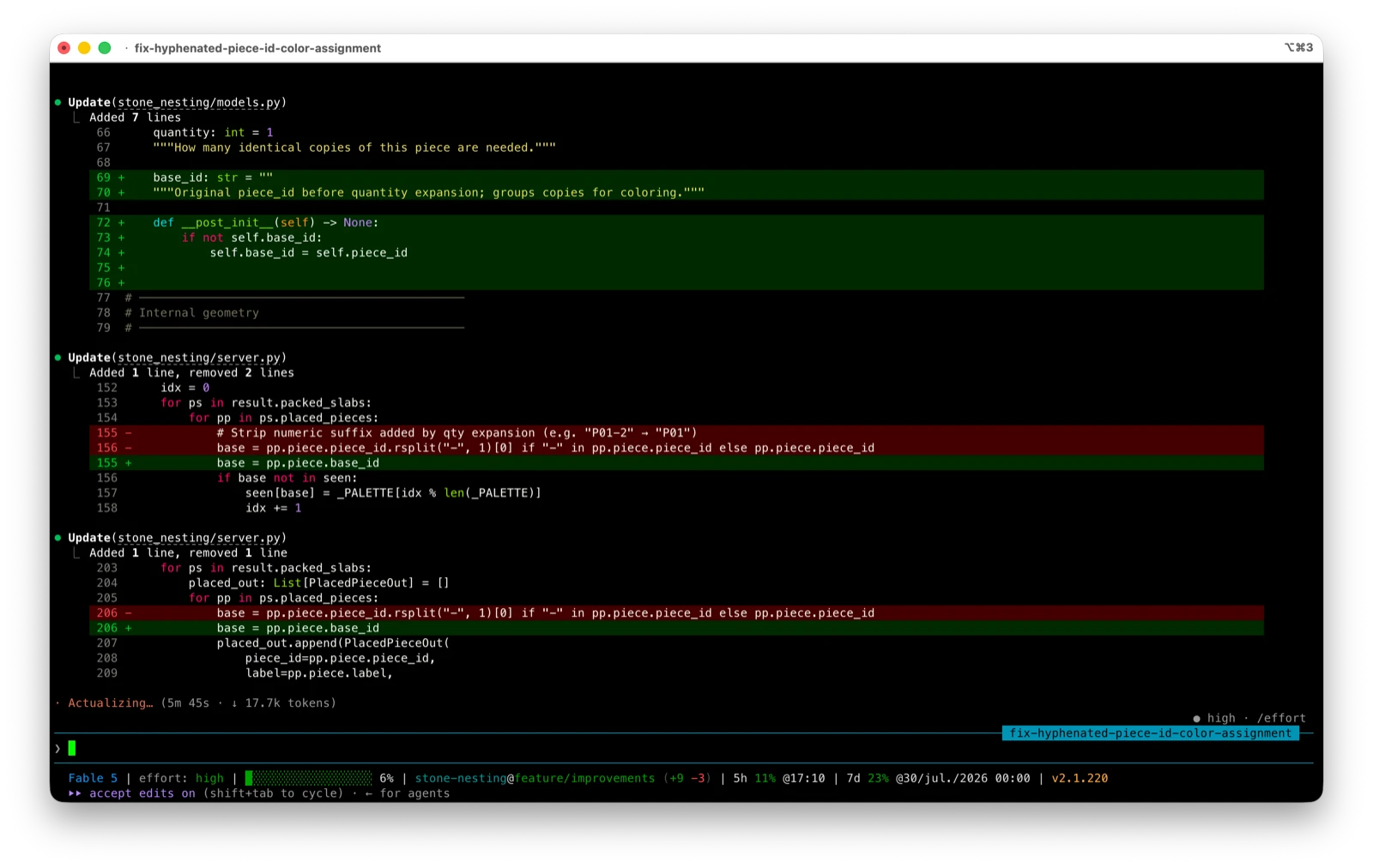
Claude Code is Anthropic’s coding agent, and the pitch is simple enough to be suspicious of: describe a task in plain English, and it reads your codebase, edits the files, runs the commands, and shows you the diff. We’ve been running it daily on the Astro codebase behind this site, and for this review we also turned it loose on a messier target: a Python nesting engine for stone slabs, with no test suite to hide behind. The screenshots below are from that session. Here’s the honest version.
Key takeaways
- Claude Code is an agent, not an autocomplete. You give it a task; it comes back with changes. That’s a different product from Cursor or Copilot, not a competing one.
- It’s bundled into Claude subscriptions, not sold separately. Pro includes it; the Free plan doesn’t.
- The best thing about it is multi-file work — refactors, “why is this failing,” changes that touch six files you haven’t opened.
- The worst thing about it is opaque usage limits. Anthropic publishes no hard numbers, so you discover your ceiling by hitting it mid-task.
- Skip it if you want a visual editor, or if you code a few hours a month. The economics only work for people who ship most days.
What is Claude Code?
Claude Code is an agentic coding tool: it reads your codebase, edits files, runs commands, and integrates with your dev tools. Where an autocomplete predicts your next line, an agent takes a whole task and works through it — planning, editing across files, running the test suite, and fixing what it broke.
The most common outdated thing said about Claude Code is that it’s terminal-only. It isn’t. Per Anthropic’s own docs, it runs in the terminal, in VS Code and JetBrains as an extension, as a standalone desktop app, and in the browser at claude.ai/code. Same engine underneath, so your CLAUDE.md instructions and MCP servers follow you between them.
The pieces that matter in daily use:
CLAUDE.md— a Markdown file in your project root that Claude reads at the start of every session. Coding standards, architecture decisions, the commands that actually work in your repo. A repo with only anAGENTS.mdworks too since v2.1.277; here’s when Claude Code reads it and when it doesn’t.- Skills and hooks — skills package a repeatable workflow into a command; hooks run shell commands before or after Claude’s actions, like formatting on every edit.
- MCP — the Model Context Protocol connects it to Jira, Google Drive, or your own internal tooling.
- Subagents — it can fan work out across multiple agents and merge the results. Genuinely useful on wide searches. Genuinely wasteful on small ones.
What is it like to use?
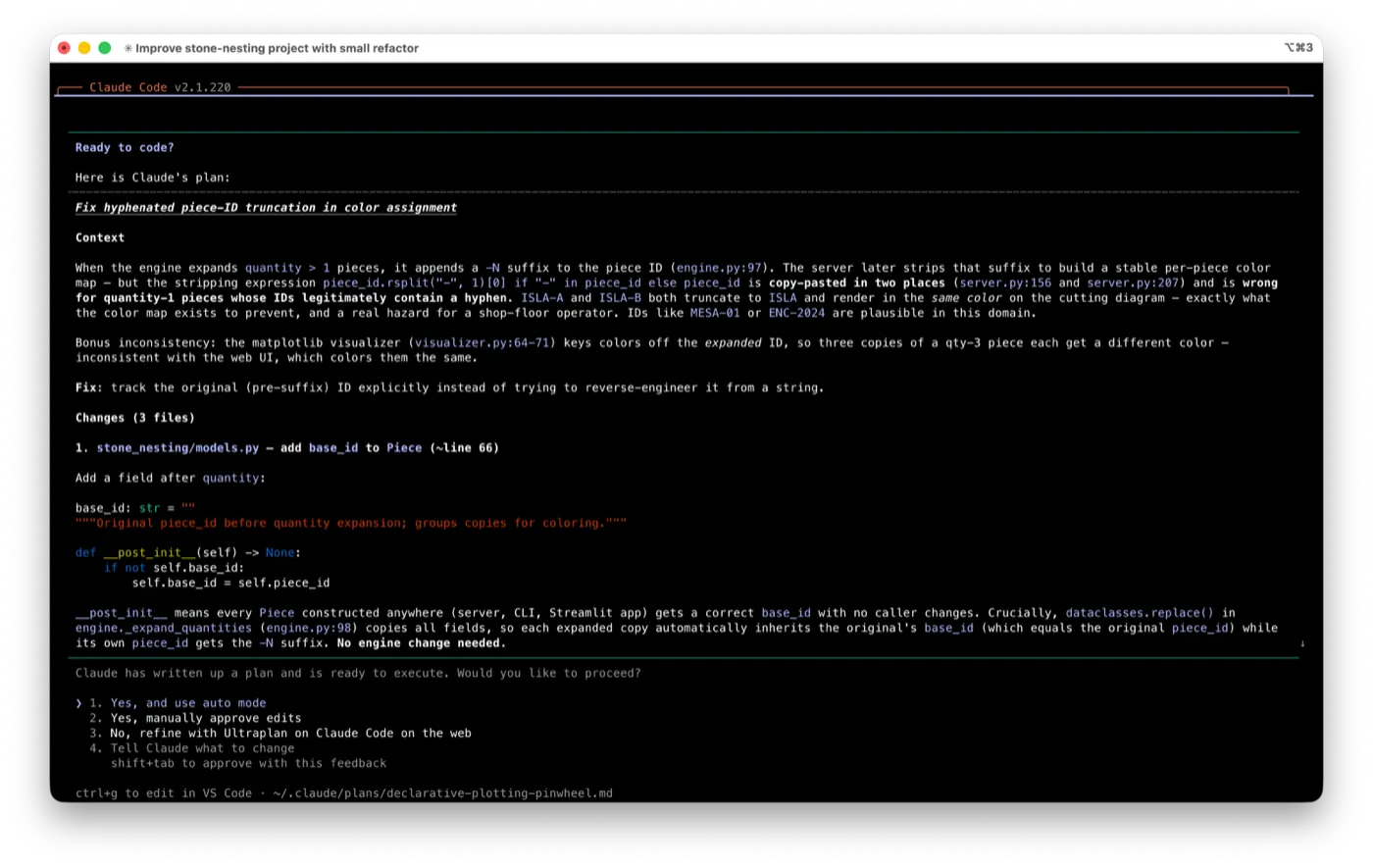
Here’s the loop on a real task. We pointed it at the nesting engine, asked in plan mode for one small improvement worth making, and let it choose. It came back with an actual bug we didn’t know about: a copy-pasted expression that strips the -N suffix quantity expansion adds to piece IDs. It also truncates any ID that legitimately contains a hyphen, so pieces ISLA-A and ISLA-B rendered in the same color on the cutting diagram. Its plan named the root cause, the three files involved, and how it would prove the fix:
Approve the plan and it starts editing — but every file change still comes back for review unless you loosen the permissions:
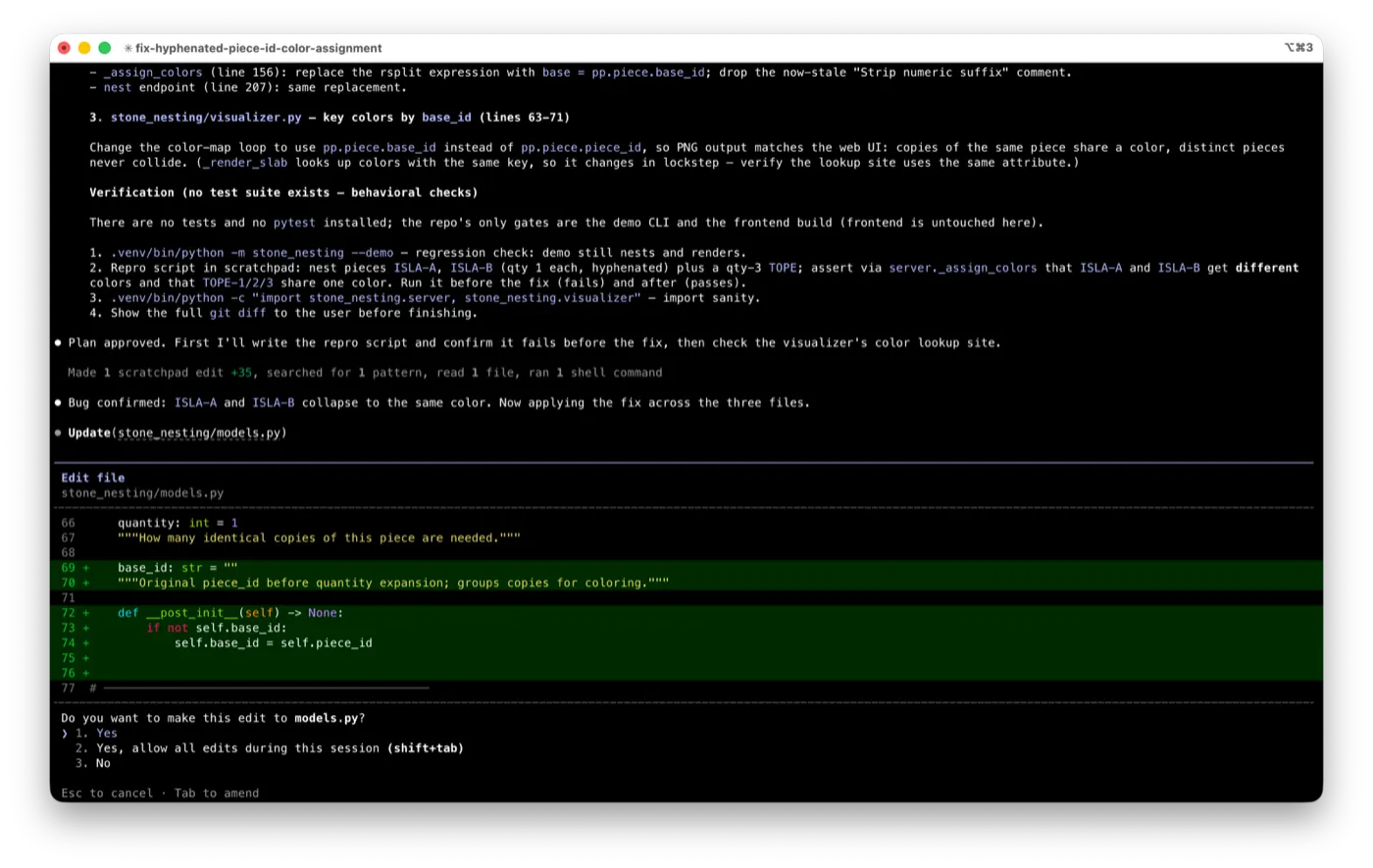
The repo has no tests, so it wrote a repro script, confirmed it failed before the fix and passed after, patched three files, and re-ran the demo CLI to check nothing regressed. It also flagged an unrelated bug it noticed along the way, as a suggested follow-up:
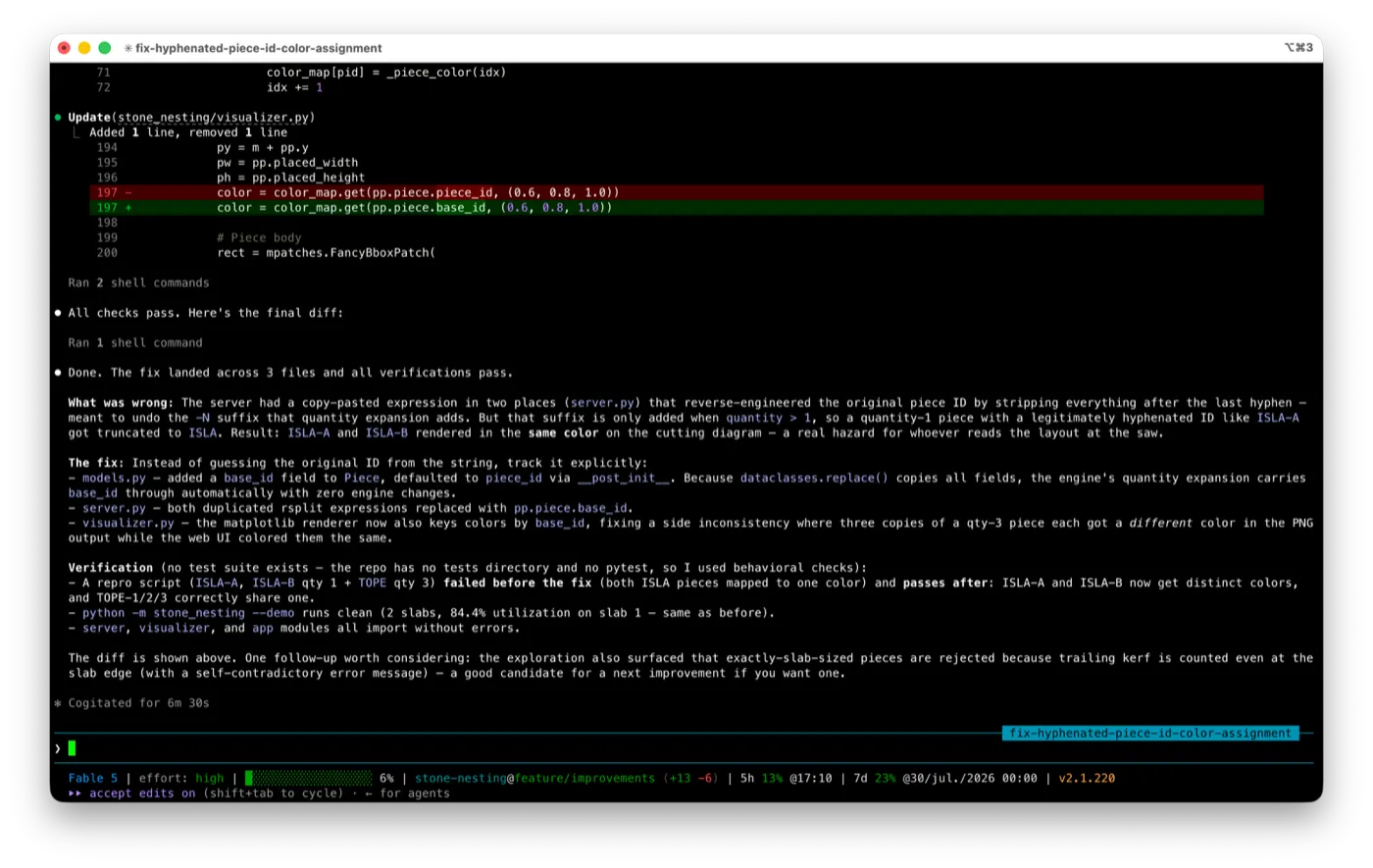
That session took about six minutes of model time and one approval from us. It’s the product’s best case — a scoped task, a reviewable diff, verification it invented for itself — and it’s representative of what delegation feels like when it works.
How much does Claude Code cost?
There’s no Claude Code price tag. Anthropic folded it into the Claude subscription, so what you pay depends on which plan you’re on:
Three things before you pick a tier. The Free plan doesn’t include Claude Code — you need Pro at minimum. Max is the same product, just more of it: 5x or 20x Pro’s usage allowance, no extra features you’d notice as a solo developer. And overage is opt-in, not automatic: hit your limit and Claude Code stops until the window resets, unless you deliberately turn on usage credits, which bill at standard API rates (Anthropic’s pricing FAQ). No surprise invoice — but no free pass either.
What are Claude Code’s biggest problems?
The usage limits are unknowable in advance. Anthropic describes plans relatively (“5x more usage than Pro”) and layers weekly limits on top of shorter windows, but publishes no hard token or request count. You cannot work out whether Pro covers your workload without buying Pro and finding out. For a tool sold to engineers — people who like to size things before committing — this is the weakest part of the product. It’s also the complaint that dominates every forum thread about it.
It can do more than you asked. Left unsupervised on a vague prompt, it’ll tidy adjacent code, add error handling for cases that can’t happen, or refactor something you didn’t mention. This is fixable (a few lines in CLAUDE.md telling it to stay in scope works), but it’s friction you have to discover.
It’s still a terminal-shaped tool at heart. The desktop and web surfaces are real, but the workflow assumes you’re comfortable reading diffs, reasoning about what a command will do, and catching a bad change before you merge it. If you can’t review the output, you can’t use the tool safely.
Verification costs you. It’s better than it used to be at checking its own work, but “it says the tests pass” and “the tests pass” are different claims. Run them yourself.
Claude Code vs Cursor vs Codex CLI
Side by side:
| Claude Code | Cursor | Codex CLI | |
|---|---|---|---|
| Shape | Agent you delegate to | Editor with AI throughout | Agent you delegate to |
| Where it lives | Terminal, IDE, desktop, web | Its own editor (VS Code fork) | Terminal |
| Billing | Bundled in Claude plans | Own plans, usage-based overage | Bundled in ChatGPT plans |
| Best at | Multi-file tasks, delegation | Writing code line by line | Sandboxed, scripted runs |
Claude Code and Cursor aren’t really rivals — one is for typing, the other for handing off. We go deeper on that split in Cursor vs Claude Code. Against OpenAI’s terminal agent, the fight is closer and mostly about sandboxing and ecosystem: see Claude vs Codex and our Codex CLI review.
Which model does it run?
Claude Code runs on Anthropic’s current lineup, and the model matters more than the tool’s own settings. Claude Opus 5 is the one Anthropic points at for coding work; Sonnet handles cheaper, faster passes.
The knob worth understanding is effort: how much the model thinks and explores before acting. Anthropic’s own guidance recommends starting Opus 5 at the default high effort and stepping up to xhigh for the most demanding coding work. That’s also why an agentic session burns tokens faster than a chat window does. If your usage feels like it’s evaporating, that’s where it’s going.
Who should buy Claude Code?
Buy it if you ship code most days, live in a terminal or don’t mind one, and have work that’s tedious rather than hard — test coverage, dependency bumps, tracing a bug through unfamiliar files. At Pro’s price above, one saved afternoon a month settles the argument.
Start at Pro, not Max. Max exists for people who keep an agent running most of the working day. Find out whether that’s you before paying five times more to guess.
Skip it if you want inline completion in a visual editor (that’s Cursor or Copilot — see our best AI IDE guide), or if you’re a hobbyist. Not because it’s bad for hobbyists, but because the subscription is priced against professional output.
More on tools in this space in our reviews, and current prices for the whole category in the pricing tracker.
Frequently asked questions
Is Claude Code worth it?
It's worth it if you already work in a terminal and ship code most days — the $20/mo Pro plan pays for itself the first time it handles a multi-file refactor you'd have spent an afternoon on. It's a poor fit if you want a visual editor with inline autocomplete, or if you code occasionally as a hobby, because the usage allowance and the terminal-first workflow are both built around heavy daily use.
Do I need a separate subscription for Claude Code?
No. Claude Code is bundled into the Claude subscription you may already pay for. Pro ($20/mo, or $17/mo billed annually) includes it; the Free plan does not. Max 5x ($100/mo) and Max 20x ($200/mo) are the same product with 5x and 20x Pro's usage allowance.
What are Claude Code's usage limits?
Anthropic doesn't publish a hard request or token count. Plans are described in relative terms — Max gives you 5x or 20x Pro's usage — and there are weekly limits on top of the shorter rolling windows. In practice that means you can't calculate your ceiling in advance; you find it by hitting it. That's our main complaint about the pricing model.
Claude Code vs Cursor: which should I use?
Cursor if you want an IDE with AI woven through it — inline completion, tab-to-accept, a familiar editor. Claude Code if you want an agent that takes a whole task and comes back with a diff. They're not really substitutes, and plenty of engineers run both: Cursor for typing, Claude Code for delegating.