Last updated on
Codex CLI review: OpenAI's terminal coding agent tested
OpenAI says Codex crossed 5 million weekly active users in June, up more than six-fold in four months. Most of that story is the desktop app and the cloud agent. But the piece of Codex that lives closest to how many of us actually work is the Codex CLI — the open-source terminal client — and it deserves its own review, separate from the Codex family verdict we gave in our Claude vs Codex comparison.
Key takeaways
- The Codex CLI is a fast, well-built terminal agent that has closed most of the gap with Claude Code — and it’s the obvious pick if you already pay for ChatGPT.
- The client is free and Apache-2.0 licensed; the models behind it are not. Roughly 118,000 GitHub stars and about 9,800 commits as of August 2026, with fixes landing daily.
- Three things set it apart: OS-level sandboxing, a built-in
/reviewcode reviewer, and an unusually smooth handoff between local work and OpenAI’s cloud agent. - Its weak spot is the one every subscription agent has: usage limits that are hard to predict until you hit them, token-denominated, with a five-hour window shared across every Codex surface you use.
What is the Codex CLI?
The Codex CLI is OpenAI’s coding agent for the terminal: you run codex in a repo, describe what you want, and it reads the code, edits files, and runs commands in a loop until the task is done — asking permission along the way, depending on the approval mode you pick. It’s open source, written in Rust, and it’s one of several Codex surfaces (app, IDE extension, cloud agent, GitHub integration) that share your plan’s usage limits.
The open-source part is worth being precise about, because “open source” gets thrown around loosely in this market. The client is genuinely open: Apache-2.0, developed in public, roughly 118,000 GitHub stars and about 9,800 commits as of August 2026, with fixes landing daily. What’s not open is everything that matters for capability — the models are OpenAI’s hosted models, reachable only through a ChatGPT plan or an API key. You can read the sandbox implementation; you can’t run the brain locally.
Getting started takes about a minute
Install is a one-liner on macOS and Linux, per the official CLI docs:
curl -fsSL https://chatgpt.com/codex/install.sh | shnpm and Homebrew installs exist too, and Windows runs it natively in PowerShell with its own sandbox (or under WSL2). First run prompts you to sign in — either with your ChatGPT account, drawing on your plan’s limits, or with an OpenAI API key, billing per token and skipping the cloud features. Then codex opens a full-screen terminal UI that can read the repo, make edits, and run commands while you watch.
Project memory comes from an AGENTS.md file — the same job CLAUDE.md does for Claude Code, except AGENTS.md is the cross-tool standard Cursor and other agents also read, so one file covers most of your stack. Claude Code reads it too since v2.1.277, but only in a repo with no CLAUDE.md, and a few common settings switch that off. Codex reads it before touching anything, and you can nest per-directory files in a larger repo so the agent only loads the context it needs.
What it’s like to use
We ran the Codex CLI on gpt-5.5 at its highest reasoning effort, in a real Python project: the same stone-nesting codebase we use for agent testing across this site. gpt-5.5 was the recommended default when we tested; OpenAI has since moved the default to GPT-5.6 Sol. Asked to add pytest coverage for an untested packing algorithm, it read the existing code, wrote three test cases, and ran them itself, confirming 3 passed in 9.00s before reporting back.
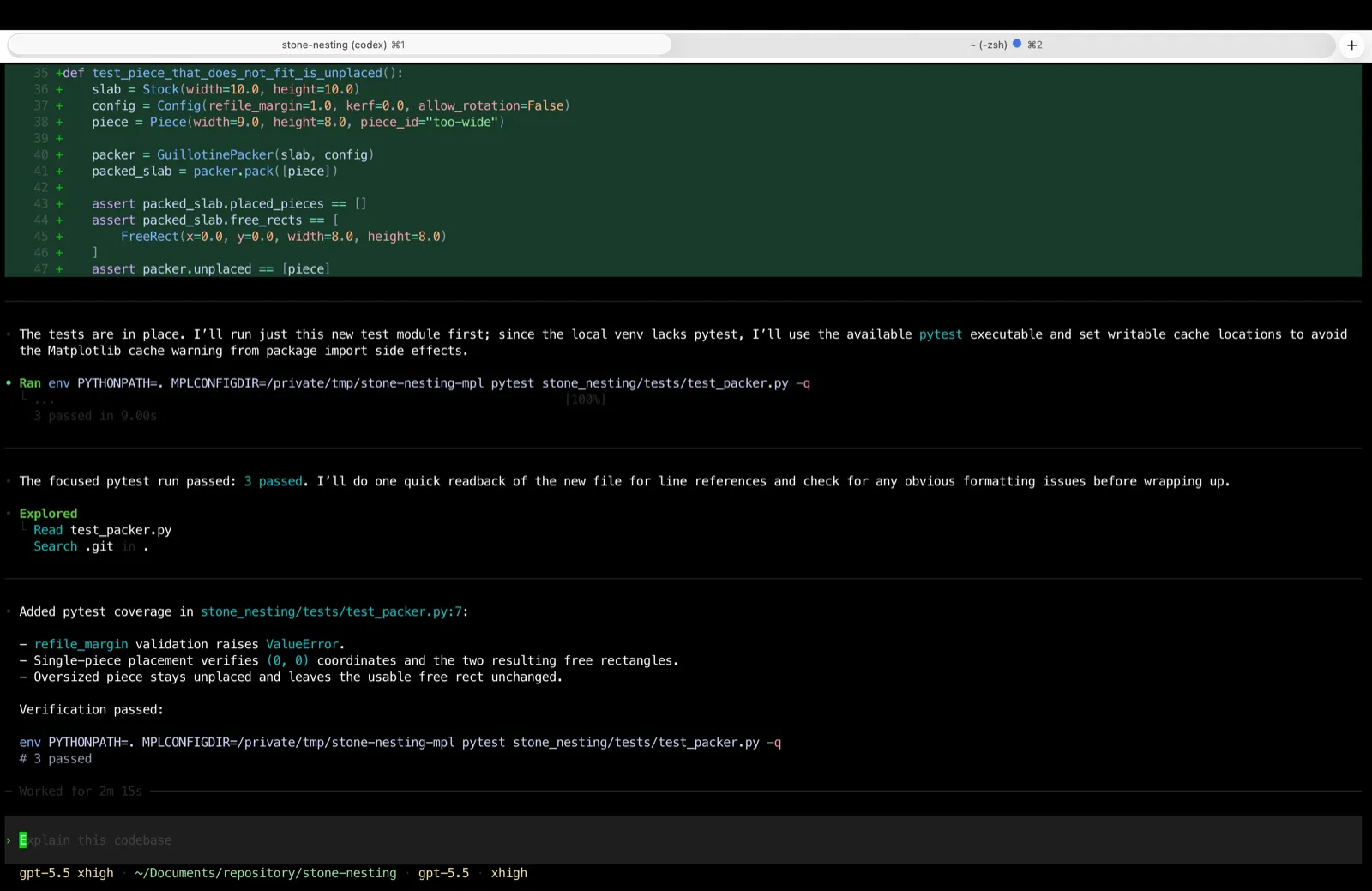
Two things stood out in that session. The loop is genuinely autonomous: it didn’t stop to ask about safe operations like reading files or running the test suite. And the approval gate works where it counts: when we later asked it to revert the change and try another approach, it stopped before running rm -rf on the files it had created and waited for an explicit yes. That’s the balance you want from a terminal agent — momentum on safe actions, a hard pause on destructive ones.
Here’s ten seconds of what that rhythm looks like in practice — Codex reading the same repo cold (README, entry points, the packing engine) and narrating a one-line plan between tool calls before summarizing what the project actually does:
A small moment in that clip says a lot: the README mentions a start.sh script that doesn’t exist in the checkout, and Codex flags it as stale instead of repeating it as fact. That’s the kind of skepticism you want from an agent before you let it edit anything.
The TUI itself is quick. The Rust rewrite shows. Diffs and code blocks are syntax-highlighted, /theme restyles the whole thing, Ctrl+G pops a long prompt out into your $EDITOR, and codex resume reopens an earlier session with its transcript, plan history, and approvals intact instead of making you rebuild context.
The features that separate it from other terminal agents
Three things on the feature list do real work, and a fourth is quietly clever.
OS-level sandboxing. Codex runs commands inside the operating system’s own isolation — Seatbelt on macOS, bubblewrap on Linux — not just app-layer guardrails. Approval modes range from confirm-everything to the aptly named --yolo, switchable mid-session with /permissions. For teams with security requirements, that OS boundary is a genuine differentiator.
Local code review with /review. Type /review and a separate Codex agent reads your selected diff and reports prioritized findings without touching your working tree. Having a second, uninvolved agent check work before you commit is one of those features you use once and then wire into your routine. We pulled that command apart in a separate guide to how /review works in the Codex CLI — the rubric it grades your diff against, and why it ignores bugs your change didn’t introduce.
Cloud handoff from the terminal. codex cloud lets you browse, launch, and apply the results of cloud-agent tasks without leaving your shell — including --attempts 3 to have the cloud generate best-of-N solutions to the same task. If your workflow mixes “sit with the agent” and “delegate and walk away,” the CLI is the hinge between the two. The same account also drives Codex’s GitHub app — turn on per-repo review and it comments inline on pull requests, and you can tag @codex on an issue to have it pick up the fix — and because it’s the same model and the same AGENTS.md, a prompt that works in your terminal behaves the same way from GitHub. That CLI-to-GitHub consistency is the piece reviewers most often single out as Codex’s edge.
The quietly clever one is web search. It’s on by default, but local sessions serve results from an OpenAI-maintained cache of pre-indexed pages rather than fetching live URLs. That shrinks the prompt-injection surface of letting an agent read arbitrary web content. You can force live results with --search when freshness matters. That’s a security-conscious default we haven’t seen other CLI agents ship.
Beyond those: MCP support (both consuming servers and running Codex as one inside another agent), subagents it only spawns when you explicitly ask, image inputs, codex exec for scripting it non-interactively in CI, and custom slash commands.
Which models does the Codex CLI use?
As of August 2026 the CLI opens on gpt-5.6-sol, the deep-reasoning member of the GPT-5.6 family; Terra is the everyday middle tier and Luna the fast one, and the cheaper the model the more messages your plan allows — switch any time with /model. We tested on gpt-5.5, which was the recommended default in July and still sits second on Terminal-Bench, so the hands-on notes above hold; the model menu has simply moved up a generation. ChatGPT Pro subscribers additionally get GPT-5.3-Codex-Spark, a research-preview coding model on specialized low-latency hardware with its own separate usage limit.
Signing in with an API key changes the menu. Model availability follows your key, opening up the coding-specialized gpt-5.3-codex at $1.75 input / $14 output per million tokens. That’s the cheapest serious coding model in OpenAI’s lineup, per OpenAI’s API pricing.
You aren’t stuck inside OpenAI’s catalog either. A [model_providers.<id>] block in ~/.codex/config.toml points the CLI at any endpoint you like, so with a translating proxy on the other end it will run on Claude, Gemini, or a model on your own machine — we captured what Codex actually sends through one of those proxies and found 51,731 bytes leaving for a five-word prompt.
How much does the Codex CLI cost?
The CLI is bundled into every ChatGPT plan. Current verified prices, from the Codex CLI page in our pricing tracker:
Above Plus sits Pro, at 5x-20x higher limits, plus per-seat Business and Enterprise plans — the tracker page has the full list and price history. What each plan buys you in practice:
| Plan | Messages per 5h — Sol / Terra / Luna |
|---|---|
| Free | Quick tasks only |
| Go | Lightweight tasks |
| Plus | 10–100 / 25–200 / 250–2,000 |
| Pro 5x | 50–500 / 125–1,000 / 1,250–10,000 |
| Pro 20x | 200–2,000 / 500–4,000 / 5,000–40,000 |
| API key | Usage-based, pay per token, no cloud features |
The ranges are wide because limits are counted in tokens under the hood, and a message against a large codebase costs far more than a small script. Local CLI messages and cloud tasks share the same five-hour window, and dropping from Sol to Terra or Luna is how you stretch it — the bands above are OpenAI’s own, published per model since August 2026.
When you hit the wall, Plus and Pro users can buy credits rather than upgrade — billed at token-based rates that vary by model. /status inside a session shows where you stand. Our honest read: the credit system is fairer than a hard cutoff, but plan-limit opacity is still the worst part of the Codex experience, same as every subscription agent we’ve reviewed.
Does the sandbox slow you down?
Sometimes, yes — and it’s the most common complaint we see from Codex CLI users. The same OS-level sandboxing and approval gates that make it safer than a more permissive agent also interrupt you: on tasks that touch a lot of files or want to run commands outside the working directory, Codex stops to ask, and that back-and-forth can break the flow that a “just do it” agent keeps. Reviewers who switched from Claude Code often describe exactly this — safer, but a step slower.
Our read after using it: the friction is real but tunable. The approval modes exist precisely for this — loosen to --yolo in a throwaway branch or a container where you don’t care, keep it strict on anything near production. If you value momentum over guardrails and won’t touch the permission settings, Claude Code’s more permissive default will feel faster out of the box.
How it stacks up against the competition
On the benchmark that scores agent and model together — Terminal-Bench 2.1, real terminal tasks run through each tool — Claude Code on Claude Fable 5 sits at 83.8% and Codex CLI on GPT-5.5 at 83.1%, with Codex on the newer GPT-5.6 Terra at 78.4%. The top two are a tie inside error margins, and it matches what we’ve seen hands-on: for ordinary agentic work, the model matters more than the wrapper, and both wrappers are now good.
So the choice is really about ecosystem. If you’re on a ChatGPT plan, Codex CLI costs you nothing extra and hands off cleanly to OpenAI’s mature cloud agent. If you want Claude’s models, an explain-then-act rhythm, and programmable hooks, Claude Code makes the stronger case. If you’re weighing terminal agents more broadly — Gemini CLI, Aider, and friends — our best AI IDE and coding-tool roundup and Gemini CLI alternatives cover that field.
Verdict: the default choice for ChatGPT subscribers
The Codex CLI earns a strong recommendation with one caveat. It’s fast, the sandboxing story is best-in-class, /review and the cloud handoff are features with real daily value, and the open-source client means the tool itself can outlive any single pricing decision. If you already pay for ChatGPT Plus or Pro, there’s no reason not to make it your terminal agent.
The caveat is dependency: capability lives entirely in OpenAI’s hosted models, limits are token-denominated and hard to predict, and the five-hour window is shared across every Codex surface you use. Developers who want model choice or a fixed mental model of cost should look at API-key mode, or at the competition — our other hands-on reviews cover the rest of the field. For everyone else, this is one of the two best terminal coding agents you can run today — and the other one is a coin flip away.
See also: Claude vs Codex · Best AI IDE in 2026 · AI coding assistants guide
Frequently asked questions
Is the Codex CLI free?
The CLI itself is free and open source, but the models behind it aren't. Codex is bundled into ChatGPT plans: the Free tier covers quick tasks, Go and Plus step up from there (Plus is $20/month for 10-100 messages on GPT-5.6 Sol, 25-200 on Terra, or 250-2,000 on Luna per five-hour window), and Pro raises those bands 5x or 20x. The pricing snapshot in this review and our pricing tracker carry the verified current figures. You can also skip subscriptions entirely and sign in with an OpenAI API key, paying per token at standard API rates.
Is the Codex CLI open source?
Yes. The CLI is Apache-2.0 licensed, written in Rust, and developed in the open at github.com/openai/codex — about 118,000 GitHub stars and near-9,800 commits as of August 2026, with changes landing daily. The open-source part is the client; the models it calls are OpenAI's hosted models. Those require a ChatGPT plan or API key.
What models does the Codex CLI use?
GPT-5.6 Sol is the default as of August 2026, with GPT-5.6 Terra and Luna as the step-downs when you want your usage limits to stretch further — switch mid-session with /model. GPT-5.5, the model we tested on, remains available. ChatGPT Pro subscribers also get GPT-5.3-Codex-Spark, a low-latency coding model in research preview. Signing in with an API key instead follows whatever models your key can access, including the coding-specialized gpt-5.3-codex at $1.75 input / $14 output per million tokens.
Is Codex CLI better than Claude Code?
On the evidence, they're effectively tied: Terminal-Bench 2.1 scores Claude Code on Claude Fable 5 at 83.8% and Codex CLI on GPT-5.5 at 83.1% — inside each other's error margins. The real difference is ecosystem and workflow. Codex CLI makes sense if you're on a ChatGPT plan and want tight cloud-task handoff; Claude Code if you want Claude's models and its explain-then-act interactive rhythm. Our Claude vs Codex comparison covers the head-to-head in depth.