Last updated on
The complete guide to AI coding assistants in 2026
A couple of years ago, “AI coding assistant” meant one thing: GitHub Copilot autocompleting your function signatures. Today the category has split into at least three distinct types of tool, each solving a different problem, and the pricing runs from free to $200 a month. This guide maps the current landscape so you know what you’re actually choosing between.
What AI coding assistants actually do
The label covers a lot of ground. Roughly, the tools break into three types:
Inline completion tools suggest code as you type — a line, a block, sometimes a whole function. You stay in your editor; the suggestion appears as ghost text. GitHub Copilot started here and most tools still offer this as a baseline.
Chat and agent tools let you describe a task in natural language and get back code, explanations, or diffs. These run inside your editor’s sidebar or a dedicated panel. The better ones can read your open files, run tests, and iterate. GitHub Copilot’s agent mode, Cursor’s composer, and Devin Desktop all work this way.
Agentic editors go further: the AI doesn’t just suggest, it drives. You give it a task — “refactor this module” or “add a retry wrapper to all these API calls” — and it opens files, makes changes, runs your test suite, and fixes what fails. Cursor and Devin Desktop are the two serious options here in 2026.
Most tools now do all three to some degree. The differences show up in how good each one is at each layer, and where they draw the line on autonomy.
The main options in 2026
GitHub Copilot
The incumbent. Copilot runs inside VS Code, JetBrains, Neovim, and a handful of others. It handles inline completion, a chat panel, code review, and an agent mode that can work across multiple files. Microsoft’s deep integration with Azure OpenAI means the model selection is broad — Copilot lets you pick from several underlying models rather than locking you to one.
The free tier covers 2,000 completions per month, which is enough to evaluate the tool properly. Two changes landed in 2026 worth knowing: new sign-ups for the paid individual plans (Pro, Pro+, Max) were paused on April 20, 2026, and on June 1, 2026 Copilot moved to usage-based billing — Pro stays $10/month and Pro+ $39/month, but premium-model requests now draw down a monthly credit pool, after which each extra request costs about $0.04. Check GitHub’s plans page for current sign-up availability before counting on a paid tier.
Starting price: Free (2,000 completions/month). Paid plans from $10/month (sign-ups for new paid plans paused as of April 2026). Verified current plans →

Cursor
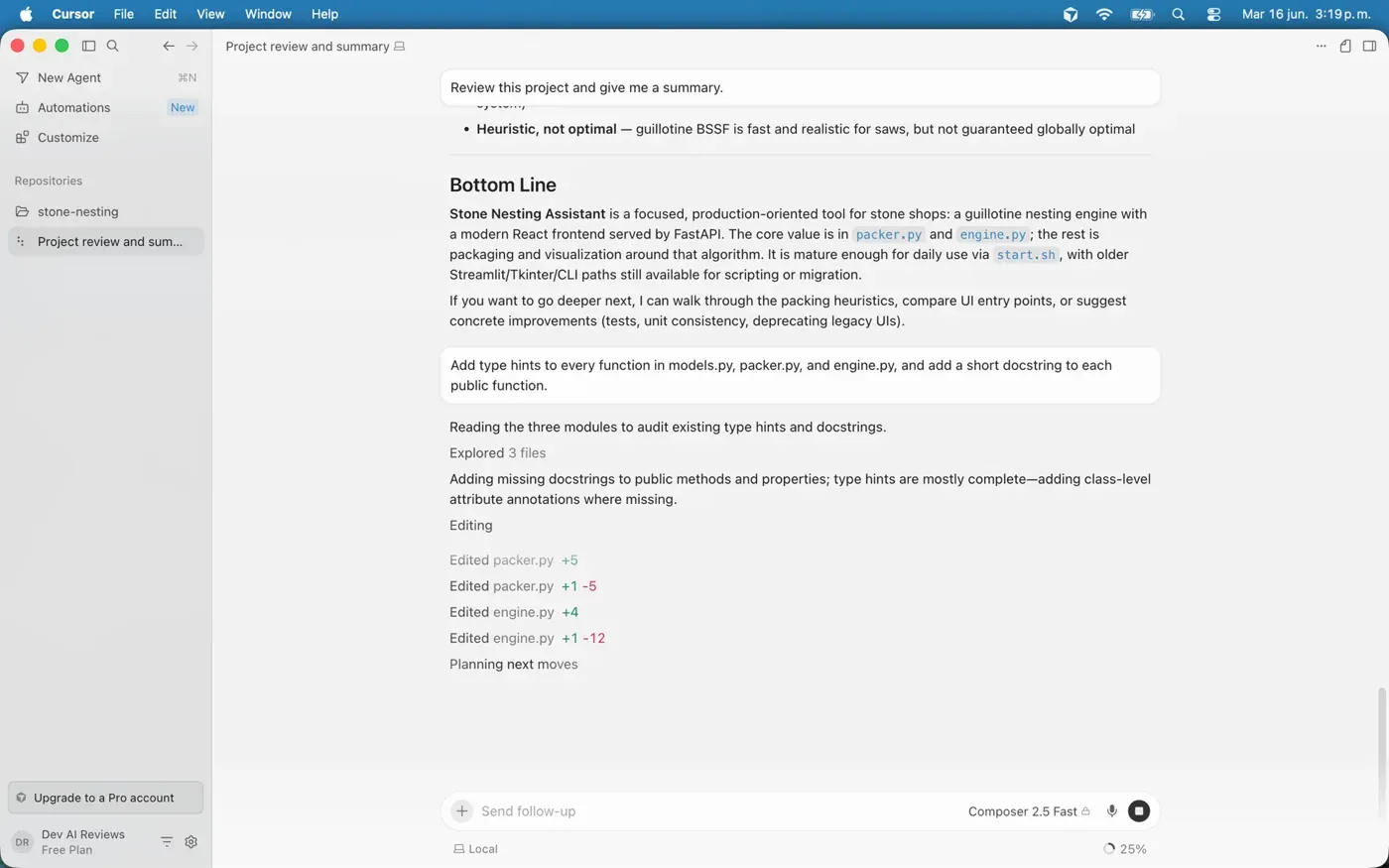
Cursor is a VS Code fork that ships with AI built into the editor itself rather than bolted on as an extension. That distinction matters: Cursor has full access to the editor’s internals, which makes its multi-file edits and codebase-wide search feel tighter than what an extension can do.
The Composer mode lets you describe what you want to change and Cursor proposes diffs across multiple files before applying them. Tab completion is fast and context-aware. The free Hobby tier has limits on agent requests; $20/month removes most of them.
If you’re already deep in a VS Code setup, the transition is low-friction. Your extensions, keybindings, and settings carry over.
Starting price: Free (limited). Individual at $20/month. Verified current plans →
Devin Desktop (formerly Windsurf)
Windsurf was a Copilot-alternative IDE that gained a following for its fast tab completion and clean interface. In 2026 it rebranded as Devin Desktop, the desktop client for Devin — Cognition’s autonomous AI software engineer. The product is now closer to an agentic coding environment than a traditional assistant: it’s designed for longer-running tasks where the AI runs a loop of edit → test → fix without you steering each step.
That shift changes who it’s for. If you want an autocomplete replacement, Copilot or Cursor are still the cleaner fit. If you want to hand off a whole task and come back to a PR, Devin Desktop is the more direct option.
Starting price: Free (limited). Pro at $20/month, Max at $200/month. Verified current plans →
Tabnine
Tabnine has been around longer than Copilot and has made enterprise compliance its differentiator. No free tier: plans start at $39/user/month on an annual subscription. What that buys you is flexible deployment — Tabnine runs SaaS, VPC, on-premises, or air-gapped — plus end-to-end encryption and guaranteed no code retention. If your team works in a regulated environment or a company that’s nervous about code leaving the building, Tabnine is the shortest path to AI completion without a lengthy legal review.
Starting price: $39/user/month (annual). No free tier.
OpenAI Codex
OpenAI’s entry in the agentic coding space isn’t a traditional IDE extension — it’s a cloud-based agent that runs tasks asynchronously. You give Codex a job (fix this bug, implement this feature), it spins up a sandboxed environment, writes the code, runs tests, and opens a pull request. You review when it’s done.
That makes Codex more like a junior teammate you assign work to than a tool you interact with in real time. Codex isn’t bundled in ChatGPT as a separate subscription — you get access through your existing ChatGPT plan. The free tier includes Codex Mini with limited daily access. A Plus subscription ($20/month) unlocks full Codex CLI, web, and IDE access. Pro ($100/month) adds higher limits and early research previews.
If you already pay for ChatGPT Plus, Codex costs you nothing extra. That’s a strong argument for giving it a look before paying for a dedicated tool.
Starting price: Free (limited, via ChatGPT). Full access with ChatGPT Plus at $20/month. Verified current plans →
Google: Gemini Code Assist and Antigravity
Google’s AI coding story now runs on two tracks depending on who you are.
For teams, there’s Gemini Code Assist — a Google Cloud product that integrates with VS Code and JetBrains, handles inline completion, chat, and a terminal CLI, and connects to your org’s internal repositories and knowledge bases. It’s built for companies already inside Google Cloud. Standard costs $22.80/user/month ($19 on annual billing); Enterprise runs $54/month.
For individual developers, the free Gemini Code Assist tier was replaced in mid-2026 by Antigravity, a separate product with its own free tier and a Google AI Pro upgrade at $20/month. Antigravity version 2.0 ships with a chat-first interface that downplays the traditional code editor — seasoned developers have complained that the IDE is buried behind a chatbot panel, though it’s still accessible. If you’re considering it, test the current interface before committing.
Starting price: Antigravity is free (individual). Gemini Code Assist Standard at $22.80/user/month (teams). Verified current plans: Antigravity · Gemini Code Assist
Claude Code (Anthropic)
Claude Code is Anthropic’s agentic coding tool. It started as a terminal CLI and still runs there, but it now also has a VS Code integration — a side panel inside the editor — so you’re not forced into the terminal. Either way it works the same: it reads, edits, and tests files using the same agentic loop as Claude’s other tools, traversing your repository, running shell commands, executing tests, and proposing or committing changes from a plain-English prompt.
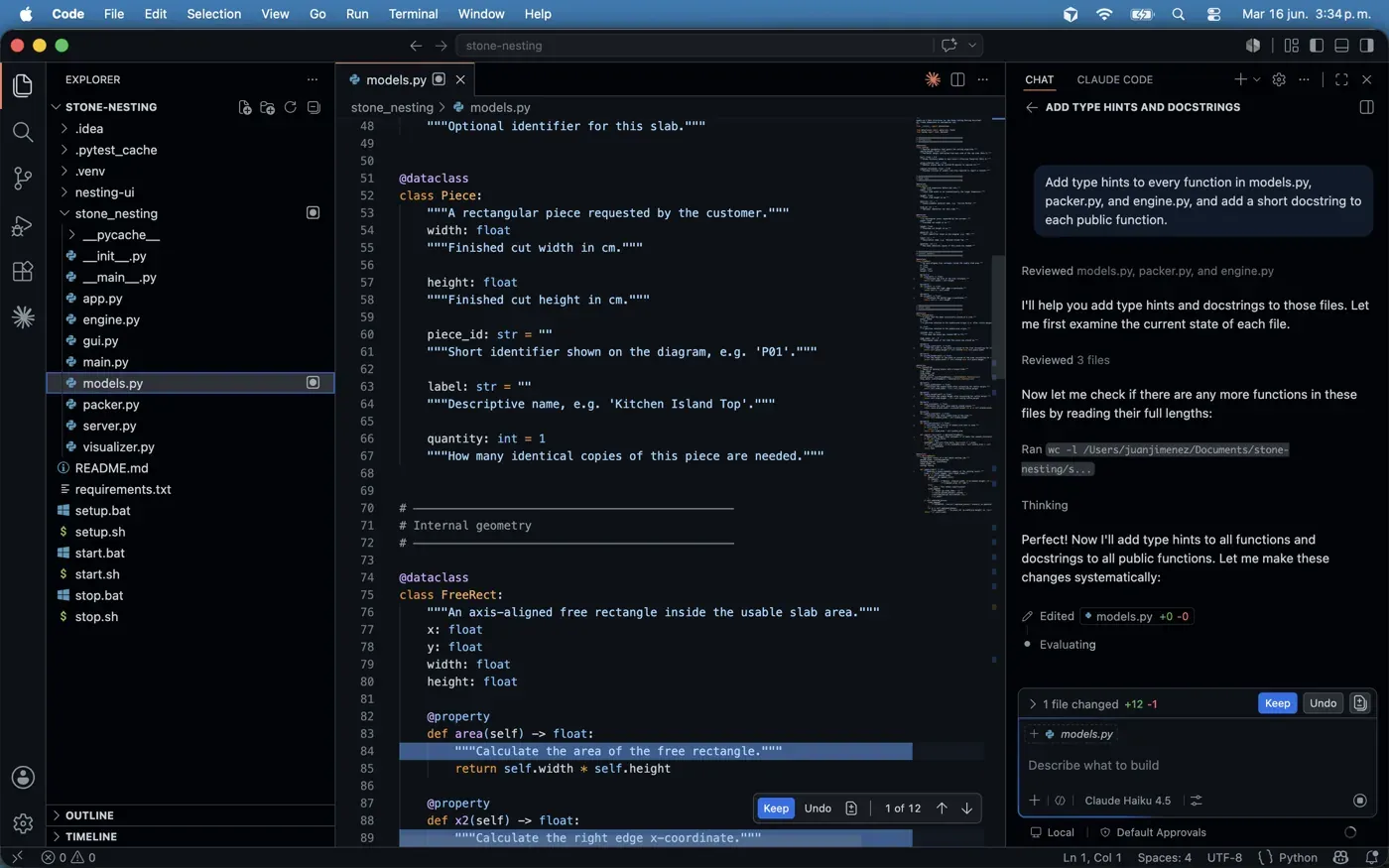
We ran the same multi-file task through Claude Code’s VS Code panel on our own project — it reviewed the files, planned the edits, and applied them inline with a Keep/Undo step, the same way the editor-native tools do. The difference is less about where it lives and more about Claude’s agentic strength on longer, multi-step work.
Access is included with a Claude Pro subscription ($20/month), which is the same plan you’d use for Claude’s chat interface. Heavy users — those running long multi-file tasks regularly — tend to move to Max ($100/month for 5x usage, $200/month for 20x) to avoid hitting the Pro limits.
The integration story is different from Cursor or Copilot: Claude Code doesn’t care what editor you’re using, because it operates entirely outside of one. That makes it a good complement to an existing setup rather than a replacement for it.
Starting price: Included with Claude Pro at $20/month. Higher usage on Max plans. Verified current plans →
Continue
Continue is the open-source option. It’s a VS Code and JetBrains extension that connects to any model you configure — you can point it at a local model via Ollama, or use it with Claude, GPT-4o, or Gemini via API key. Free to use; you pay only for whatever API calls your model of choice makes.
The trade-off is setup time. Getting a local model running and tuned is more work than installing Copilot, and the out-of-the-box experience is rougher. For teams that need full data control and have the engineering appetite to configure it, Continue is worth the effort.
Starting price: Free (model costs vary by provider).
Pricing at a glance
Prices below were correct when we last updated this guide; our AI coding tools pricing tracker keeps the verified, dated plan list for each tool and is the better reference if you’re reading this later.
| Tool | Free tier | Paid (individual) | Key strength |
|---|---|---|---|
| GitHub Copilot | 2,000 completions/month | From $10/month | Editor breadth, model choice |
| Cursor | Limited | $20/month | Native VS Code fork, multi-file edits |
| Claude Code | — | $20/month (via Claude Pro) | Terminal-based, works in any editor |
| OpenAI Codex | Limited (via ChatGPT) | $20/month (via ChatGPT Plus) | Async agentic tasks, auto PRs |
| Devin Desktop | Limited | $20/month (Pro) | Long-horizon agentic work |
| Tabnine | None | $39/month (annual) | Enterprise compliance, on-prem |
| Google Antigravity | Free | $20/month (Google AI Pro) | Individual Google devs |
| Gemini Code Assist | — | $22.80/month (Standard) | Google Cloud teams |
| Continue | Free | Free (API costs) | Open-source, full data control |
Every row above is priced per developer, which is the norm but not the only structure. Augment Code is the clearest counterexample we track: a flat $100/month covering up to 50 seats, with LLM inference, retrieval, and compute drawing from one shared pool instead of a per-user allocation. Whether that beats per-seat pricing depends entirely on how hard your team actually uses it — the pool runs dry at the same $100 whether five people or forty are spending it.
How to pick
Start with the free tiers. GitHub Copilot’s free plan and Cursor’s Hobby tier are both generous enough to form a real opinion. If you already have ChatGPT Plus, test Codex at the same time — it costs you nothing extra.
Match the tool to the task. For line-by-line coding speed, Copilot or Cursor’s Tab completion is the fastest. For restructuring a module or implementing a spec across files, Cursor’s Composer, Devin Desktop, or Claude Code all work well — they each approach multi-file edits from a different angle. For handing off a whole task and reviewing a PR when it’s done, Codex or Devin Desktop.
Think about your environment. If your team runs on Google Cloud, Gemini Code Assist has integrations the others don’t. If your company has data residency requirements, Tabnine or a self-hosted Continue setup is the realistic path. If you want the most capable agentic tool without changing your editor at all, Claude Code runs from the terminal against whatever repo you’re in.
We’re running each of these tools through real projects and publishing individual reviews. Start with our Cursor review or the Cursor vs GitHub Copilot comparison if you’ve already narrowed it down to those two. And since every assistant here runs on top of an underlying model, our best AI models for developers guide is worth a read before you commit. The rest of our developer guides go deeper on setup, cost and security once you’ve picked one.
Frequently asked questions
What is an AI coding assistant?
It's a tool that helps you write code using AI. The category splits into three types: inline completion tools that suggest code as you type (like GitHub Copilot's autocomplete), chat and agent tools that take a natural-language request and return code or diffs, and agentic editors that drive the work themselves — opening files, making changes, running tests, and fixing failures. Most modern tools do all three to some degree.
Which AI coding assistant should a beginner start with?
Start with the free tiers. GitHub Copilot's free plan and Cursor's Hobby tier are both generous enough to form a real opinion without paying. If you already have ChatGPT Plus, you can test OpenAI Codex at the same time for no extra cost. Try them on your own project for a week before committing to a paid plan.
How much do AI coding assistants cost?
Most individual paid plans land around $10–20/month: GitHub Copilot from $10, Cursor and Claude Code at $20, OpenAI Codex via ChatGPT Plus at $20. Tabnine is $39/month (annual) for its compliance focus, and Continue is open-source and free apart from the API tokens you use. Several tools also have a usable free tier.
What's the difference between Cursor, GitHub Copilot, and Claude Code?
GitHub Copilot is an extension that runs inside VS Code, JetBrains, and other editors. Cursor is a VS Code fork with AI built in at a deeper level, which makes its multi-file editing and agent loops stronger. Claude Code is terminal-based and works against whatever repo you're in, regardless of editor. They overlap, but Copilot favors editor breadth, Cursor favors multi-file power, and Claude Code favors editor-agnostic agentic work.