Last updated on
Windsurf is now Devin Desktop: what actually shipped
Cognition renamed Windsurf to Devin Desktop on June 2, 2026 and replaced its long-running Cascade agent with a successor called Devin Local. Two months on, plenty of people who installed it are still typing into Cascade without realizing it.
That’s not a bug, and Devin Local isn’t vaporware. It’s a documented fallback: Devin Local can arrive switched off, and when it isn’t available your tab quietly opens Cascade instead — the agent Cognition scheduled for retirement in July.
Key takeaways
- Windsurf wasn’t discontinued. It was renamed to Devin Desktop on June 2, 2026 and delivered over the air.
- Devin Local is real and shipped. Same harness as Devin CLI, rewritten in Rust, with subagents.
- Cascade is still the fallback, and a fresh install can land you on it without saying so.
- Switching is a settings toggle and a restart, not a reinstall.
- Cognition published two different end-of-life dates for Cascade, thirty days apart.
- Pricing didn’t move.
How we tested this
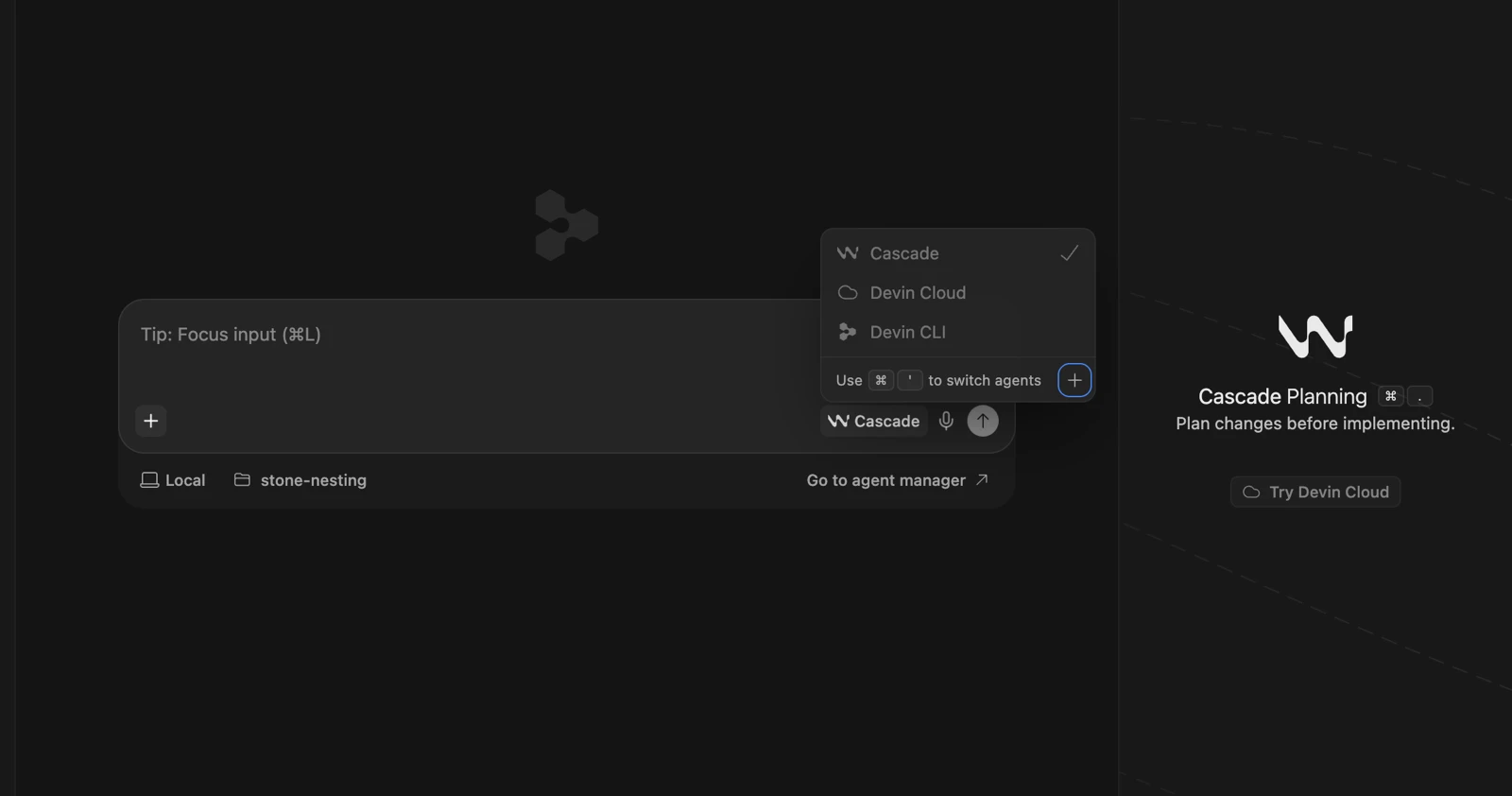
Fresh install on macOS, August 2, 2026. Devin Desktop 3.6.27, commit 0becb483, built 2026-07-31, on VS Code OSS 1.126.0. Check for Updates returned “There are currently no updates available,” so this is the current shipping build. Free account, no card. It opened on the editor with Cascade selected and no Devin Local entry in the agent picker, which is the screenshot at the top of this page.
Two limits, stated plainly because they bound what we can claim.
We installed clean, so we can’t verify the migration experience first-hand. Everything below about settings porting over and the update arriving over the air is Cognition’s FAQ, not us. And our test workspace was in Restricted Mode, VS Code’s untrusted-folder state. Cognition’s docs say that mode disables Cascade, Devin Local, and every ACP agent outright. So we can’t tell you whether Devin Local was missing from the picker because it ships off, because of Restricted Mode, or both. Trust the folder before you draw conclusions from your own install.
Is Windsurf discontinued?
No. Windsurf was renamed, not shut down. On June 2, 2026, Cognition rebranded it to Devin Desktop and folded it into the Devin line alongside Devin Cloud, Devin CLI, and Devin Review.
The clearest signal is the domain. We checked with curl on August 2: windsurf.com/pricing returns a 308 to devin.ai/pricing, and windsurf.com itself 308s to devin.ai/desktop. A 308 is permanent.
One exception if you bought through procurement: legacy Windsurf Enterprise customers still sign in at windsurf.com/enterprise, and Cognition Platform accounts use devinenterprise.com.
The ownership history gets garbled a lot, so: Cognition signed the definitive agreement to acquire Windsurf on July 14, 2025, picking up its IP, product, trademark, and brand along with a business it described as $82M of ARR and 350+ enterprise customers. No purchase price was disclosed. If you see a dollar figure attached to that deal, it’s a press report, not a disclosure.
What is Devin Local, and did it replace Cascade?
Devin Local is the successor to Cascade, and Cognition’s docs call it “the primary local agent for Devin Desktop.” It’s the same agent harness Devin CLI runs, which is the point: the agent you get in the IDE and the one you get in a terminal are now the same engine.
Cognition says its team has “completely rewritten the local agent from scratch in Rust,” and claims it’s “up to 30% more token efficient” than Cascade with support for subagents. That efficiency number is the vendor’s own and we haven’t benchmarked the two side by side, so treat it as a claim rather than a measurement.
They aren’t the same agent under different names. The docs give them separate permission models, separate MCP config paths, and different feature sets — Devin Local doesn’t carry Cascade’s Memories and Workflows. Cognition shipped a “Devin: Open Cascade Migration Wizard” command precisely because moving between them takes work.
Why a fresh install can still land you on Cascade
Because Devin Local can arrive switched off, and the fallback is silent.
Cognition’s docs spell out the behavior: “New tabs start with Devin Local when you haven’t chosen a preferred agent (falling back to Cascade if Devin Local isn’t available to you).” Nothing in the interface announces that you got the fallback. You open a tab, you get an agent, you start typing.
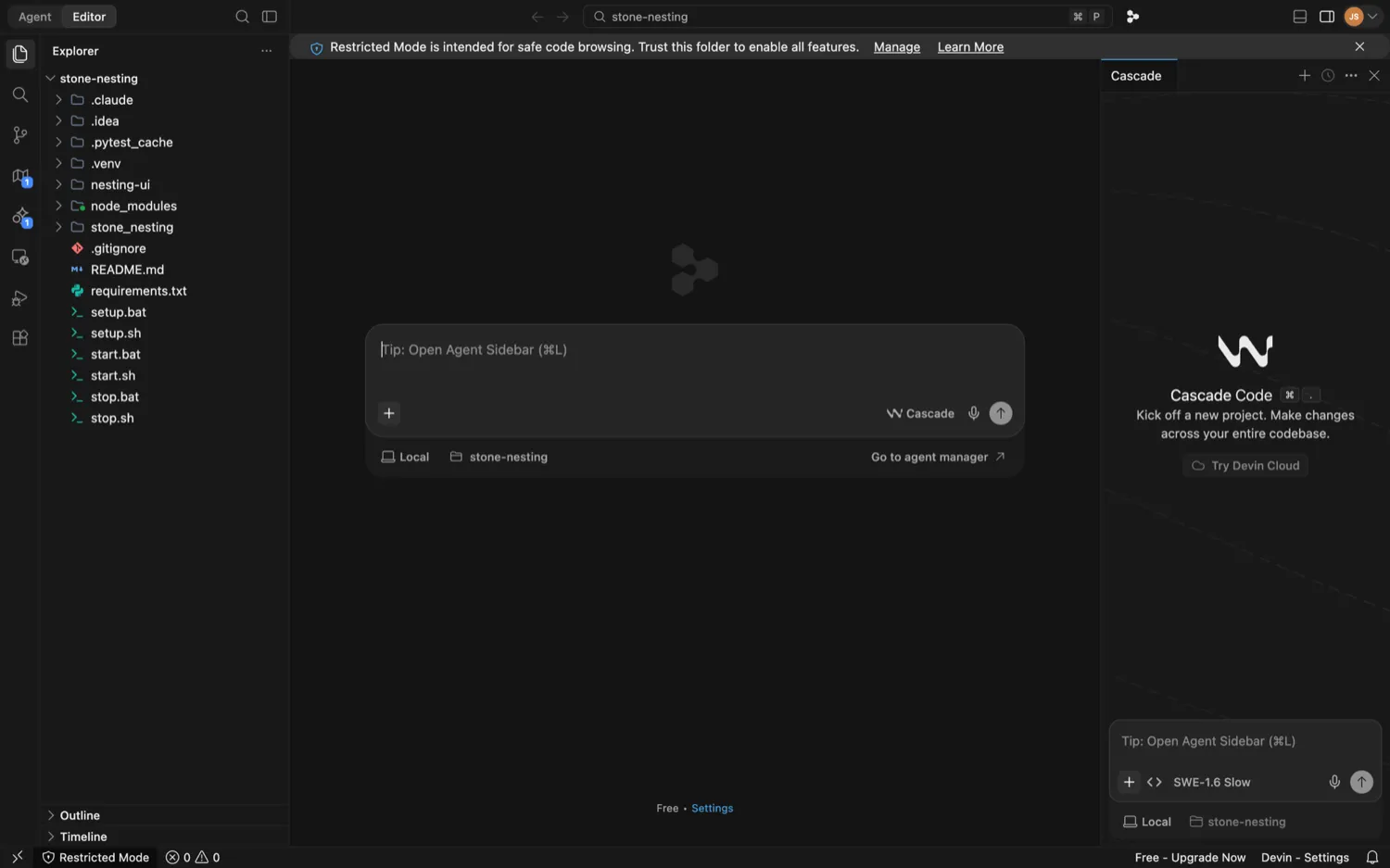
That matters more than it sounds, because the two agents don’t expose the same models. The changelog notes that models marked “Devin Local only” — “including every GPT-5.6 variant” — show as disabled in Cascade’s model picker with a tooltip pointing you to Devin Local. If you’ve been wondering why half the model list is greyed out, the answer may be the agent you’re on rather than the plan you’re paying for.
How to check, and how to switch
If Devin Local isn’t in your agent picker, Cognition’s own troubleshooting steps are:
- Open the Command Palette.
- Open Devin User Settings.
- Click the Agents tab.
- Toggle the Devin Local agent on.
- Restart Devin Desktop.
One thing to rule out first. If your workspace is open in Restricted Mode, no agent will work. The docs are explicit that Cascade, Devin Local, and every ACP agent are disabled there, and hooks neither load nor run. Trust the folder, then check the picker.
Cognition published two different end-of-life dates for Cascade
The announcement post says you “can still continue to use the legacy Cascade agent through July 1st.” The FAQ says “The existing Cascade agent remains available through July.” Same product, same vendor, thirty days apart.
Neither has been corrected, and the practical answer appears to be the later one. On July 31, 2026 — after both deadlines under the earlier reading — Cognition shipped an enterprise setting to “Control Where Legacy Cascade Is Available,” turning it into a scope choice: enabled everywhere, JetBrains plugin only, or disabled, “so admins can move users to Devin Local while keeping Cascade in the JetBrains plugin.”
That’s not a product winding down on a fixed date. It’s one being managed through a long migration. If you planned a hard cutover around July 1, you planned around the more aggressive of two numbers the vendor never reconciled.
Is the Agent Command Center the default surface?
Cognition says both things, in the same post. “Devin Desktop puts them in one place, and makes the Agent Command Center the default surface” appears a few paragraphs from “Devin Desktop is a full IDE with an agent manager built in — not the other way around.”
On our install it was the second one. The app opens in Editor mode, with an Agent / Editor toggle in the top-left corner, and the Command Center is somewhere you switch to. Since our workspace was in Restricted Mode and agents are disabled there, we’re not going to tell you what the Command Center looks like in normal use.
The idea behind it is the most interesting part of the rebrand anyway: it’s built around the Agent Client Protocol, an open standard that lets any compatible agent run inside any compatible editor. Cognition’s product page lists Codex, Claude Agent, and OpenCode alongside its own agents. A vendor making it easy to run a competitor’s agent in its own IDE is a genuinely unusual bet.
How much does Devin Desktop cost?
Pricing carried over from Windsurf unchanged. Cognition’s FAQ is blunt about it: “Your current plan continues to work exactly as it does today. Pricing is unchanged,” legacy Enterprise contracts included.
Paid plans run on a usage allowance that refreshes daily and weekly, and you can buy extra billed at API pricing once you exhaust it. If you were already on prompt-based credits, the FAQ says you stay on them. The team math deserves a second look before you commit: Teams charges a flat base fee for the organization plus a per-seat fee, so the base only amortizes with headcount and a two-person team pays a steep effective rate. Check the current figures on our Devin Desktop pricing page before you model it.
Should you switch to Devin Local?
If you’re still on Cascade, yes, and sooner rather than later. But do it deliberately, not by discovering it.
Cascade is on a managed wind-down. Cognition is shipping admin controls to scope it out, the migration wizard exists for a reason, and the newer models are being routed to Devin Local only. Staying costs you model access first and support later.
The narrower cases:
- You migrated in June on the July 1 deadline. You were early, not wrong. The later date is the operative one, but the direction was right.
- You depend on Cascade’s Memories or Workflows. Devin Local doesn’t have them. Run the migration wizard and check what survives before you flip.
- You’re on JetBrains. Cognition’s July 31 setting explicitly preserves Cascade in the JetBrains plugin, so your timeline is different from the desktop one.
- You’re evaluating fresh. The rename is a footnote; the real question is how this compares to Cursor and Claude Code. Our roundup of the best AI IDEs covers that field, and the guide to AI coding assistants lays out the categories.
The thing to take from this isn’t that Cognition botched the rename. It handled the boring parts cleanly, and Devin Local is a real upgrade on paper. It’s that a silent fallback plus two published deadlines adds up to a lot of developers running an agent they think they migrated off. Open the picker and check.
See also: Best AI IDEs of 2026 · The complete guide to AI coding assistants · Best free AI coding assistants · Devin Desktop pricing · All developer guides
Frequently asked questions
Is Windsurf discontinued?
No. Windsurf was renamed, not shut down. On June 2, 2026, Cognition rebranded it to Devin Desktop and shipped the change as an over-the-air update. According to Cognition's FAQ, accounts, extensions, settings, and keybindings carry over automatically. windsurf.com now permanently redirects to devin.ai, so there's no Windsurf-branded page left, but the editor itself is still there under a new name.
Did Devin Local replace Cascade?
Yes. Devin Local is Cognition's successor to Cascade — the same agent harness Devin CLI uses, rewritten from scratch in Rust, with subagents and a claimed 30% better token efficiency. Cognition's docs call it the primary local agent for Devin Desktop. Cascade is still present as a fallback, and Cognition set its end of life for July 2026, but the two are separate agents with separate settings, not one renamed as the other.
Why is Cascade still my agent in Devin Desktop?
Because Devin Local can arrive switched off. Cognition's docs say new tabs start with Devin Local when you haven't chosen a preferred agent, falling back to Cascade if Devin Local isn't available to your install. That's what we saw on a fresh install in August 2026. To switch, open the Command Palette, go to Devin User Settings, open the Agents tab, toggle Devin Local on, and restart Devin Desktop. Note that a workspace open in Restricted Mode disables every agent, so trust the folder first.
Did Devin Desktop pricing change after the rename?
No. Cognition's FAQ states that your current plan continues to work exactly as it does today and that pricing is unchanged, including for legacy Windsurf Enterprise contracts. The tier structure is Free, Pro, Max, Teams, and Enterprise, with paid plans running on a usage allowance that refreshes daily and weekly. Some existing accounts stay on prompt-based credits. Current figures are on our Devin Desktop pricing page.