
Last updated on
7 best free AI coding assistants in 2026
Most AI coding tools have a free tier. A few are genuinely useful at zero cost — a standing free tier you can use indefinitely, not a 7-day trial. There’s always a ceiling, though, and on a busy coding day you’ll hit it.
Here’s what each tool actually gives you for free, and where the limit bites. (When a free tier stops being enough, the verified paid plans for these tools live in our pricing tracker.)
| Tool | Free tier | Best for | Upgrade when |
|---|---|---|---|
| GitHub Copilot | 2,000 completions + 50 chat/mo | Lowest-friction start in VS Code | You use chat daily or want agent mode |
| Cursor | 2,000 tab + 50 slow requests/mo | Trying Composer and multi-file editing | You want fast requests day to day |
| Devin Desktop | Unlimited Tab + light agent quota | A Cursor-style editor with free unlimited autocomplete | You want to live in the agent |
| Kiro | 50 agent requests/mo (+ signup bonus) | Spec-driven, agentic workflows | You run agents regularly |
| Trae | 5,000 autocompletions + ~1,000 requests/mo | The most generous hosted free tier | You hit the cap or the peak-hour queue |
| Aider | Free tool, pay per API token | Terminal workflow, no request cap | Never — you only pay for tokens |
| Continue.dev | Free tool, pay per API token | In-editor BYO-key assistant | Never — you only pay for tokens |
1. GitHub Copilot
Free tier: 2,000 code completions + 50 chat requests per month. As of a June 24, 2026 change, the free plan uses Copilot’s automatic model selection as its only option — “Auto” routes each request to what it judges the best available model rather than letting you pick one manually, and it doesn’t include the premium models (like Opus 4.6 or o3) available on a paid plan.
GitHub Copilot’s free tier is the most useful starting point for VS Code developers because the tool integrates directly into the editor you’re already using — no fork, no separate app, no configuration beyond installing the extension.
2,000 completions sounds like a lot. For a light coding day it is. For a developer who uses tab completion constantly, it runs out in a week. The 50 chat requests per month is the harder limit — if you use Copilot Chat for any substantive questions or refactoring, 50 is a few days of real use.
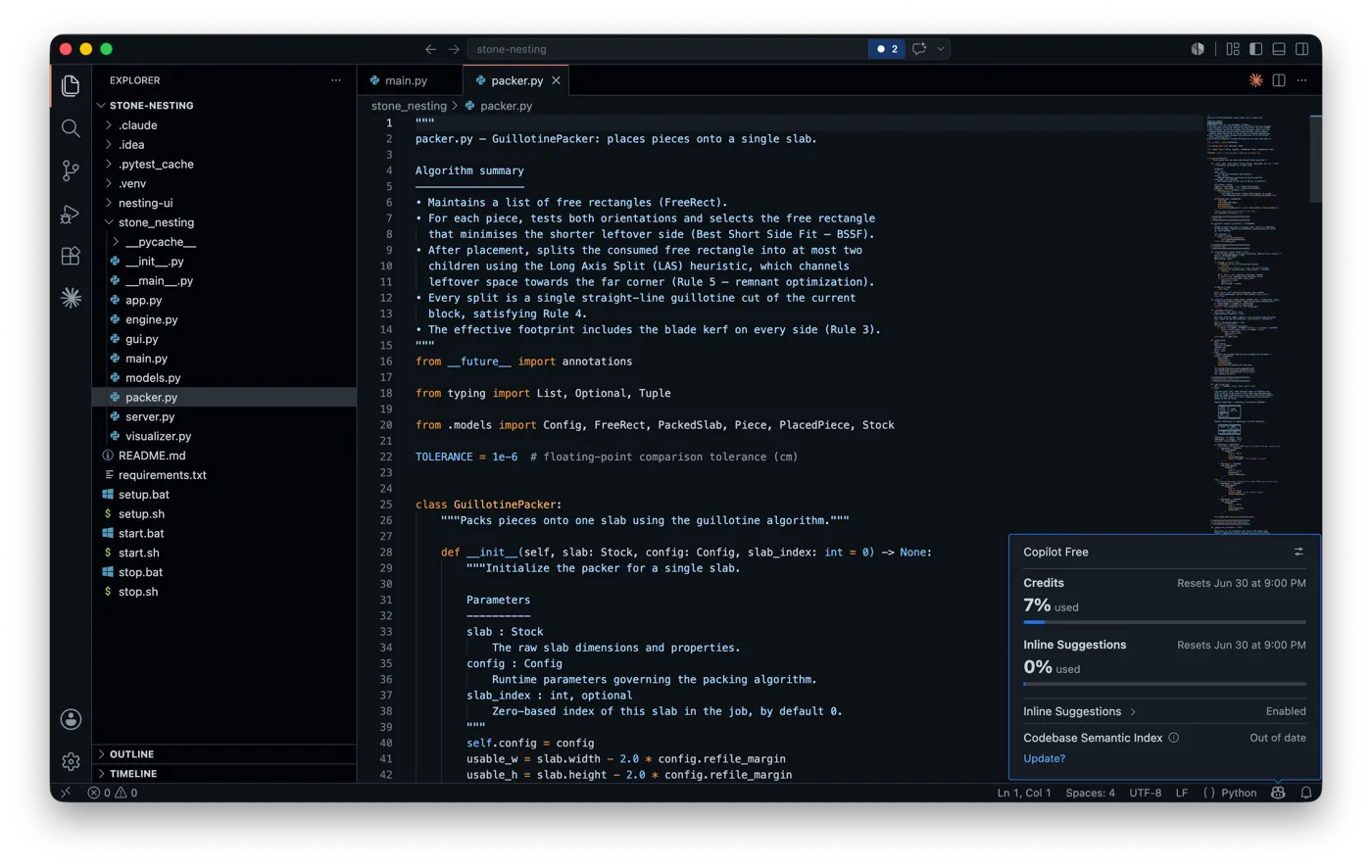
The free plan now shows your usage against a monthly pool right in the editor — handy for seeing how fast you’re burning through it before you decide whether Pro is worth it.
The free tier has no agent mode access. Agent mode requires Copilot Pro:
Best for: Developers who want to try AI completions without committing to a subscription. The free tier is good for evaluation; most developers who find it useful will hit the limit and upgrade.
2. Cursor
Free tier (Hobby): 2,000 tab completions + 50 “slow” AI requests per month.
Cursor’s Hobby tier is worth installing specifically to try Composer — the multi-file diff feature that Cursor does better than any extension-based tool. That experience is available on the free tier, just rate-limited to slow model responses.
The “slow” qualifier on the 50 requests matters. Slow requests use less-capable or slower model routing. For evaluating whether Cursor’s approach fits your workflow, it’s sufficient. For day-to-day use, it isn’t.
Best for: Trying Cursor’s Composer and agent mode on your actual codebase before deciding whether the Pro subscription makes sense.
3. Devin Desktop
Free tier: Unlimited Tab autocomplete and inline edits + a light agent quota, with a limited model selection. No credit card.
Devin Desktop is the tool you might still know as Windsurf. Cognition — the company behind the Devin agent — bought Windsurf (formerly Codeium) and folded it into the Devin brand in June 2026. It’s still the same VS Code-style editor. The agentic multi-file mode moved from Cascade to Devin Local, which Cognition rewrote in Rust on the same harness as Devin CLI; Cascade stays as the fallback when Devin Local isn’t enabled, so a fresh install can quietly leave you on the older agent — see what the rename actually shipped. The name and the owner changed; the editor didn’t.
The free tier splits the way Windsurf’s always did. Tab autocomplete is unlimited and never draws on your quota, so if you mostly want fast inline completions you can run on the free tier indefinitely. The agentic side runs on a usage allowance that refreshes on a daily and weekly cycle, and the free pool is light: enough to learn how the agent behaves, not to live in it.
Paid plans (Pro, Max, and a per-seat Teams tier) raise the agent quota and unlock the full model lineup:
Best for: Developers who want a Cursor-style editor with genuinely unlimited free autocomplete, plus a taste of agentic editing before paying.
4. Kiro
Free tier: 50 agent requests per month, plus a bonus credit allowance for your first month. No credit card, no AWS account.
Kiro is AWS’s spec-driven coding environment, and it’s where Amazon Q Developer users are being pushed (more on that below). Instead of reacting prompt by prompt, Kiro works from a written spec — it plans, implements, and verifies changes across the codebase against that spec.
The free tier is 50 agent requests a month, measured in credits: a simple “vibe” request is cheap, a full spec request costs more. That’s enough to run the spec workflow on a small project and decide whether the approach fits how you work. The bonus credits at signup give you a more generous first month to evaluate it.
Paid plans start at Pro for $20/month and go up to Power at $200/month.
Best for: Developers who want to try spec-driven, agentic development — and anyone migrating off Amazon Q Developer.
5. Trae
Free tier: 5,000 autocompletions + around 1,000 requests per month, with hosted models and no API key to manage.
Trae is ByteDance’s AI IDE, and its free tier is the most generous hosted option on this list. You get 5,000 autocompletions and roughly 1,000 agent requests a month, with Claude, GPT, Gemini, and DeepSeek available as selectable backends — no API key, no separate billing. Its Builder mode can scaffold a whole project from a description.
Two honest caveats. Free-tier requests queue behind paying users at peak times, so it can feel slow when everyone’s working. And it’s a ByteDance product — if your code or your employer is sensitive about that, weigh it before you wire it into a real project.
Paid plans are cheap by this category’s standards: Lite at $3/month, Pro at $10/month.
Best for: Developers who want the most usage out of a free hosted tier and don’t mind the peak-hour queue or the ByteDance ownership.
6. Aider
Free tier: The tool itself is free (open-source, MIT license). You pay only for the API tokens you use.
Aider is the most flexible “free” option because the cost structure is different: there’s no subscription, no monthly cap on requests, and no slow tier. You install it, connect your own API key (Anthropic, OpenAI, Google, or others), and pay per token used.
For developers who want to use Claude Sonnet 5, a typical coding session runs $0.50–2.00 in API costs. A full workday of agentic use might run $5–15. If you have an existing API budget from another project, adding Aider costs nothing extra.
Aider’s git-native workflow (automatic commits, explicit diffs, rollback via git revert) is available at any usage level — no tier restriction.
Best for: Developers comfortable with terminal workflows who want unlimited agentic use and direct control over model choice and cost.
7. Continue.dev
Free tier: The extension itself is free and open-source (Apache 2.0). Same cost structure as Aider — you pay only for the API tokens you use.
Continue is a VS Code and JetBrains extension that, like Aider, sidesteps the “monthly cap” problem entirely by not charging for the tool itself. You bring your own API key — Claude, GPT, Gemini, or a local model through Ollama — and Continue routes your requests to it. There’s no Continue-specific quota to run out of; the only ceiling is what you’re willing to spend on the model.
The trade-off versus Aider is the interface: Continue lives inside your editor as inline completions and a chat sidebar, closer to how Copilot feels, rather than Aider’s terminal-first workflow. If you want Copilot’s in-editor experience without paying Microsoft, and you already have an API key from somewhere, Continue is the free option that gets you there.
Best for: Developers who want an in-editor (not terminal) AI assistant with no subscription and full control over which model it calls.
Five that didn’t make the list
Claude Code. Anthropic’s terminal-based coding agent is genuinely strong, but it has no free tier at all — the entry point is a Claude Pro subscription or pay-as-you-go API credits. There’s nothing to evaluate for free beyond Claude.ai’s regular chat, which isn’t the same product. If you want to try it, budget for it from day one.
Amazon Q Developer. It used to belong here — unlimited completions plus a free agent quota. But AWS is retiring it: new free-tier signups have been closed since May 2026, and the product reaches end of support in April 2027 (our Amazon Q Developer pricing page tracks what’s left of the paid tiers until then). AWS is steering everyone to Kiro, which is on our list above. If you’re an existing Q user, plan the migration; if you’re new, just start with Kiro.
OpenAI Codex CLI. Technically available on the ChatGPT Free plan, so it’s not absent for the same reason as Claude Code. But the free-tier limits are thin enough that you’ll hit the ceiling testing basic local tasks, well before you’ve formed an opinion on it. We’re leaving it off this list until the free allowance is generous enough to actually evaluate the tool.
Gemini Code Assist. It had one of the most generous free tiers around — but Google shut the individual tier down. Per Google’s own announcement, the Gemini Code Assist IDE extensions and CLI stopped serving requests for individuals on June 18, 2026, and users are pushed to migrate to Antigravity, whose free quota is far thinner. A free tier that’s already gone isn’t one we can recommend you build a workflow on. If you were using it, plan the migration; if you’re not, start elsewhere.
Tabnine. It used to belong here, but as of 2026 Tabnine no longer offers a standing free tier — what’s left is a 14-day trial, then a paid plan. Tabnine’s real pitch is privacy and on-premise deployment, so if that’s why you’re looking at it, evaluate the paid or self-hosted plan directly. Just don’t expect a free tier to test it with.
Which one to actually start with
For most developers: GitHub Copilot free if you’re in VS Code and want the lowest-friction start. Cursor Hobby if you specifically want to evaluate Composer and multi-file editing. Aider or Continue.dev if you want no monthly cap and don’t mind paying per token — terminal for Aider, in-editor for Continue.
The tools worth paying for — Copilot Pro and Cursor Pro, at the prices in the snapshots above — are distinguishable from their free tiers within a week of real use. If the free tier doesn’t feel limited after a week, you probably don’t need the paid version.
See also: AI coding assistants guide · Cursor review · AI tool comparisons
Frequently asked questions
What's the best free AI coding assistant in 2026?
For most developers, GitHub Copilot's free plan is the lowest-friction start if you're in VS Code. Cursor's Hobby tier is worth it specifically to try Composer and multi-file editing. If you work in the terminal or want no monthly cap, Aider or Continue.dev are free open-source tools where you only pay for the API tokens you use.
Which free AI coding tools have no monthly limit?
Aider and Continue.dev. Both are open-source and free — there's no subscription and no request cap. You connect your own API key (Claude, GPT, Gemini, or a local model via Ollama) and pay only for the tokens you use. Aider is terminal-based; Continue lives in your editor.
Is GitHub Copilot free?
Yes — its free tier gives about 2,000 code completions and 50 chat requests per month, enough to evaluate it. Devin Desktop goes further with unlimited Tab autocomplete that never draws on your quota, metering only the agentic features. Most free tiers are generous enough to test a tool, but you'll hit the ceiling on a busy day.
Why aren't Claude Code or OpenAI Codex on the list?
Claude Code has no free tier at all — the entry point is a Claude Pro subscription ($20/month) or API credits. OpenAI Codex is technically available on the ChatGPT Free plan, but its free limits are too thin to meaningfully evaluate the tool, so it's left off until the free allowance is more generous.