Last updated on
Best AI code review tools in 2026: an honest comparison
AI code review tools read your pull requests and leave inline comments — flagging logic bugs, security issues, and regressions before a human reviewer gets to them. In 2026 there are more of them than any team can trial, and nearly every “best of” list ranking them is written by one of the vendors being ranked.
So here’s the honest version. We’ve pulled the current facts — what each tool runs on, which Git platforms it supports, and what it actually costs — from primary sources, and we’re upfront about the one thing most roundups get wrong: the accuracy percentages everyone quotes aren’t as solid as they look.
Key takeaways
- No single “best” tool. The right pick is decided by your Git platform and how much review noise your team will tolerate, not by a leaderboard.
- CodeRabbit is the safest all-rounder — it’s one of the few reviewers spanning GitHub, GitLab, Bitbucket, and Azure DevOps, and pairs that reach with a real free tier.
- Greptile indexes your whole codebase and leans toward catching more, accepting more false positives to do it.
- Claude Code Review runs a fleet of agents in parallel on a PR, but it’s a research preview limited to Team and Enterprise plans and billed per review.
- GitHub Copilot and ChatGPT Codex bundle review into a broader coding subscription — convenient if you already pay, not best-in-class on their own.
- Ignore the precise accuracy numbers in most comparisons. They rarely link to a reproducible benchmark.
What is an AI code review tool?
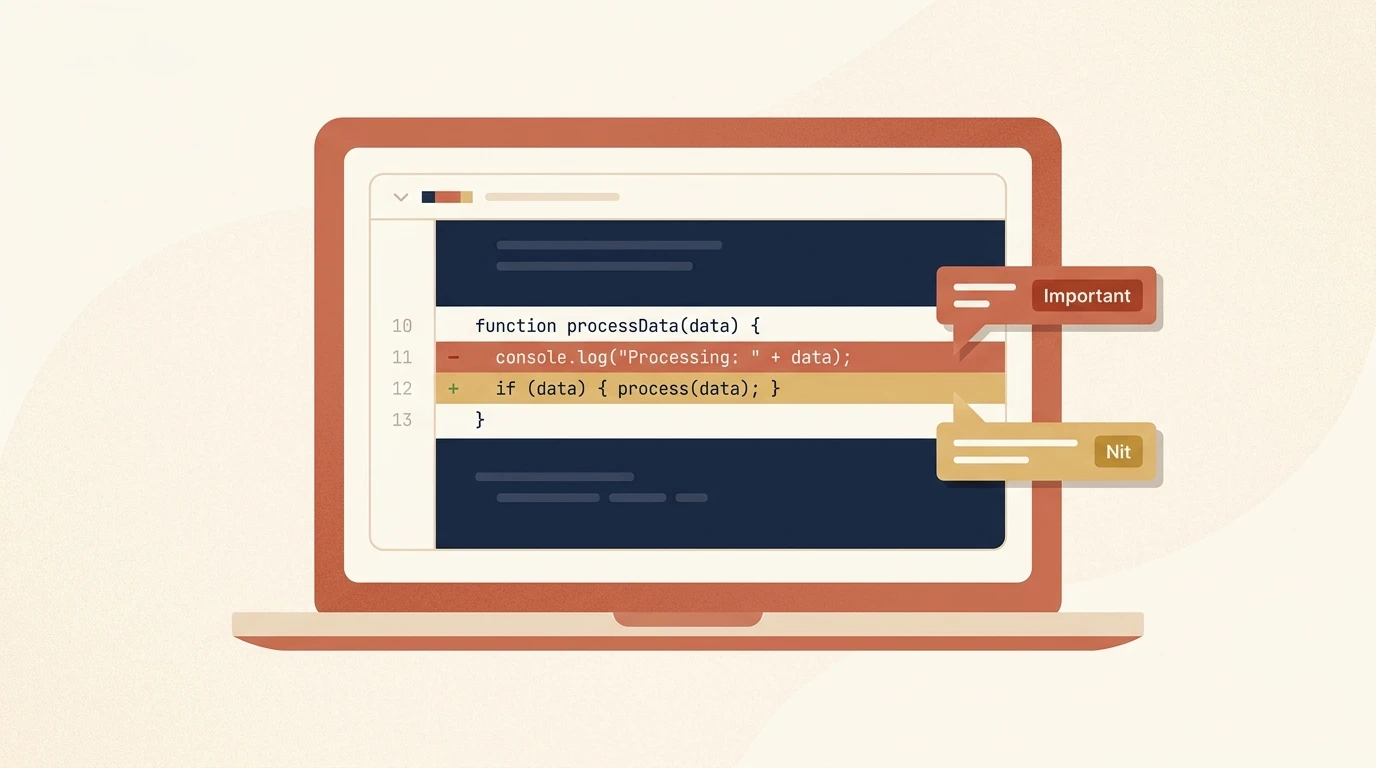
An AI code review tool is a bot that runs when you open or update a pull request, analyzes the diff (and often the surrounding codebase), and posts findings as inline comments on the exact lines where it sees a problem. Most tag findings by severity and leave the merge decision to you — they add a review layer, they don’t gate it.
That’s the important distinction from older static analysis. A linter or SAST scanner matches known patterns with fixed rules. An AI reviewer uses a language model to reason about what the code is trying to do, so it can flag a logic error or a broken edge case that no rule expresses. The trade-off is that it’s probabilistic: it will sometimes miss a real bug and sometimes flag a non-issue.
The best AI code review tools in 2026, compared
Here’s how the main options line up on the facts that don’t depend on a benchmark — approach, platform support, and starting price. Prices are the paid entry tier; verify the current figure on each vendor’s pricing page before you commit.
| Tool | Approach | Platforms | Free tier | Paid from |
|---|---|---|---|---|
| CodeRabbit | Line-by-line PR reviewer, all major Git hosts | GitHub, GitLab, Bitbucket, Azure DevOps | Yes | ~$24/dev/mo |
| Greptile | Full-codebase indexing for deep context | GitHub, GitLab | Yes (limited) | ~$30/dev/mo |
| Claude Code Review | Fleet of parallel agents on Anthropic infra | GitHub | No (Team/Enterprise) | ~$15–25/review (token-based) |
| GitHub Copilot | Review bundled into the Copilot subscription | GitHub | Yes (limited) | ~$10/user/mo |
| Qodo Merge | Cross-repo context, on-prem/air-gapped option | GitHub, GitLab, Bitbucket | Trial only | ~$30/user/mo |
| Graphite | Low-noise reviewer built for stacked PRs | GitHub | Yes (limited) | ~$20/user/mo |
| Codacy | SAST + AI hybrid, security-first | GitHub, GitLab, Bitbucket | Yes | ~$18/dev/mo |
CodeRabbit: the safest all-rounder
CodeRabbit is the default recommendation for most teams because it removes the biggest constraint — your Git platform. It’s one of the few widely-used AI reviewers that works across GitHub, GitLab, Bitbucket, and Azure DevOps (Qodo is another), so a shop running GitLab for backend and GitHub for open source can standardize on one tool. Its free tier covers private repos with PR summaries and IDE/CLI reviews; the full line-by-line PR bot you see below runs on the Pro tier, with a two-week trial to evaluate it properly. Its design bias is toward precision — fewer, higher-signal comments — so teams are less likely to start ignoring it.
We tested it on a real pull request: a bare except: pass swallowing every exception, including ones you’d want to know about. CodeRabbit caught it, tagged it “Minor | Quick win,” and explained exactly why — catch OSError specifically instead of everything — with a one-click suggested fix attached.
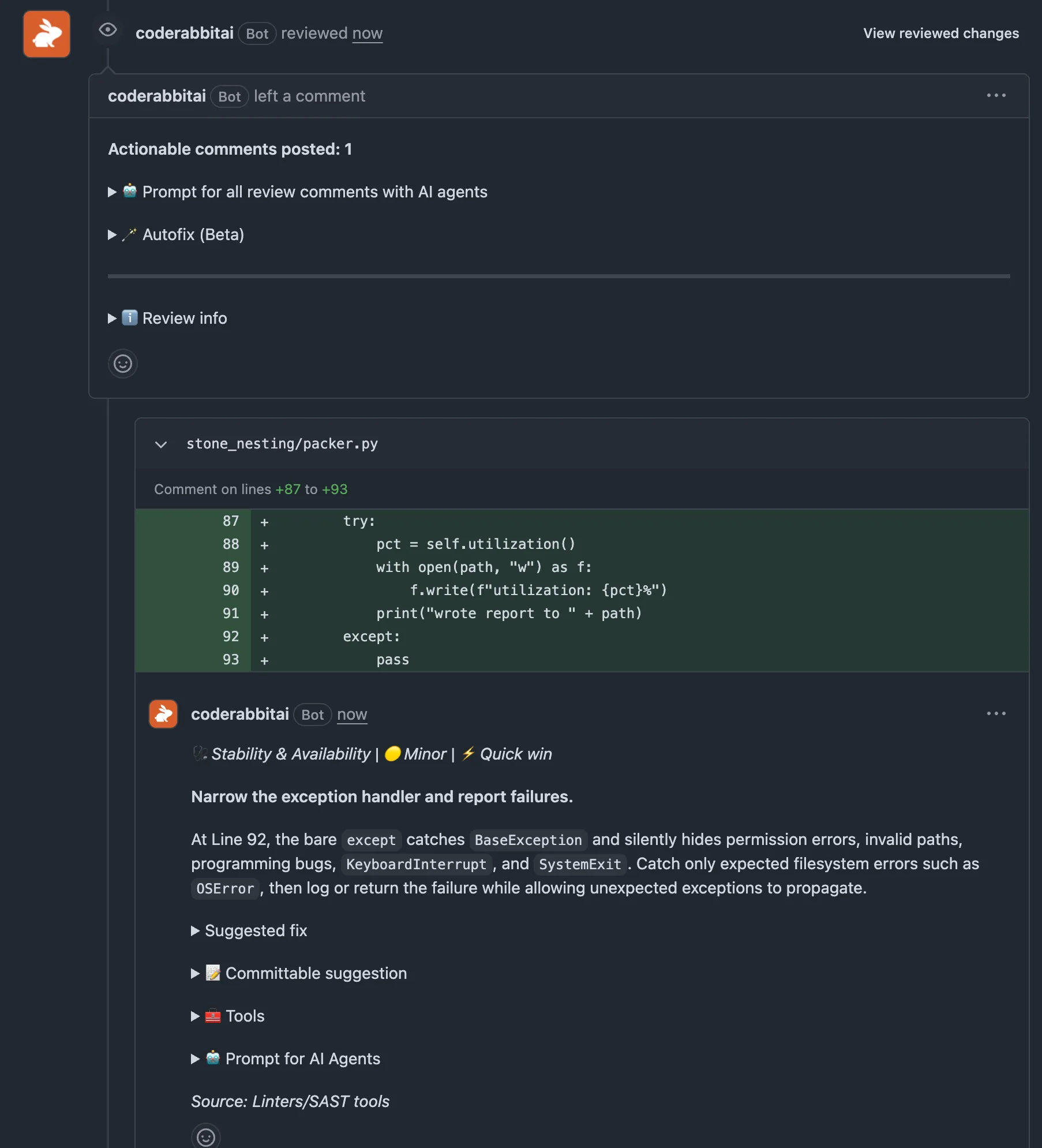
Worth noting: on our first pass, a smaller, subtler issue (a utilization calculation with no guard against a zero-area slab) went unflagged — “no actionable comments” — until we added the more obvious bug. That’s a small, honest data point for the “how reliable is the catch rate” question below: precision-tuned tools can miss quieter issues.
For a full breakdown of CodeRabbit’s pricing tiers, setup, and how to tame the noise, see our dedicated CodeRabbit review.
Greptile: deeper context, more noise
Greptile indexes your entire repository and reviews a PR against that full context, not just the diff. That’s the right architecture for catching bugs that only show up when a change ripples across modules — the kind a diff-only reviewer can’t see. The cost is noise: a whole-codebase reviewer surfaces more candidate issues, and more of them turn out to be false positives, especially in the first weeks before you’ve tuned it. It’s GitHub and GitLab only. There’s a free Starter tier — a fixed monthly pool of review credits for a single developer — plus a paid plan when you outgrow it.
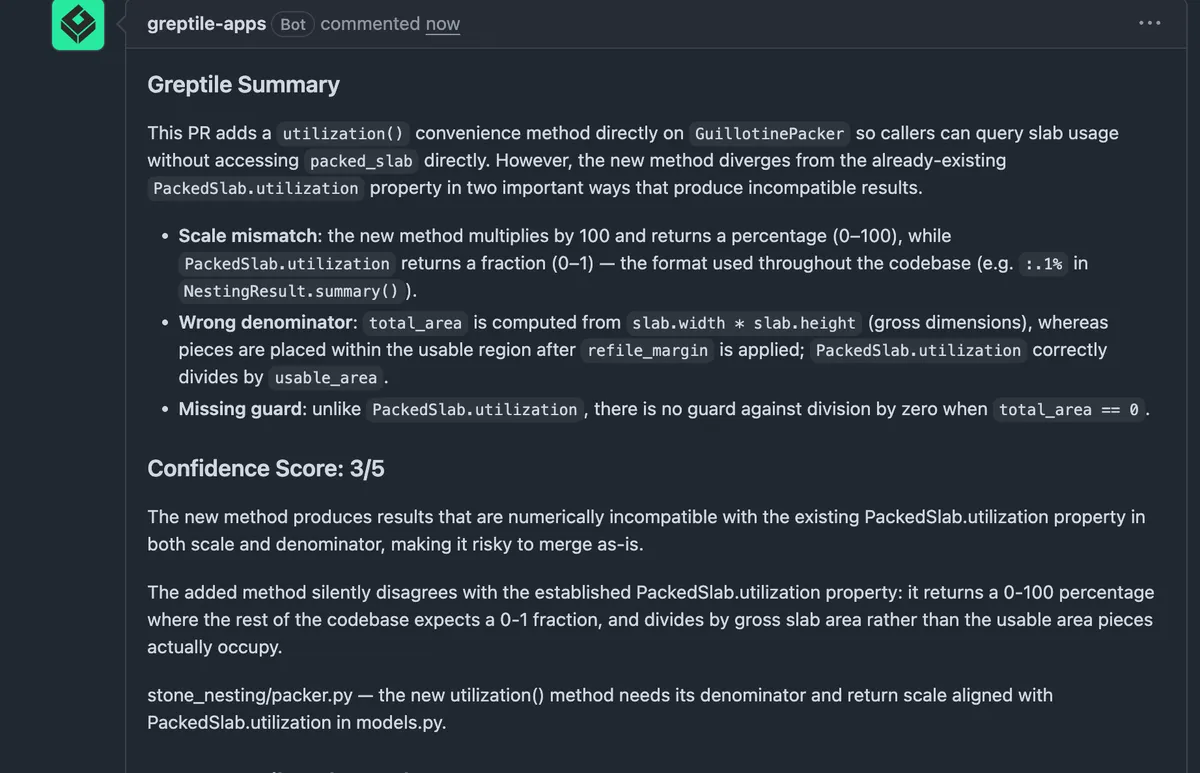
We put that full-context claim to a real test: a PR that added a second utilization() method quietly duplicating logic that already existed elsewhere in the codebase — with a different, incompatible scale and denominator. A diff-only reviewer looking at just the changed file has no way to know that second implementation exists. Greptile flagged it directly: scale mismatch, wrong denominator, and a missing zero-division guard, reasoned against the original method in a completely different file — and scored its own confidence at 3/5.
Claude Code Review: parallel agents, with real limits
Claude Code’s review feature takes a different shape. When a review runs, according to Anthropic’s docs a fleet of specialized agents analyze the diff in parallel on Anthropic’s infrastructure — each looking for a different class of issue — and then a separate verification step checks each candidate against the actual code before posting, to filter out false positives. Findings come tagged as Important, Nit, or Pre-existing, and never block your merge.
Two caveats matter before you plan around it. It’s a research preview limited to Team and Enterprise plans (and unavailable to organizations with Zero Data Retention), and it’s billed by token usage — averaging $15–25 per review rather than a flat monthly seat, charged separately from your plan’s included usage. Reviews take around 20 minutes on average, so this is depth over speed. If you want to try the same engine locally first, the /code-review command runs in any Claude Code session without installing the GitHub App.
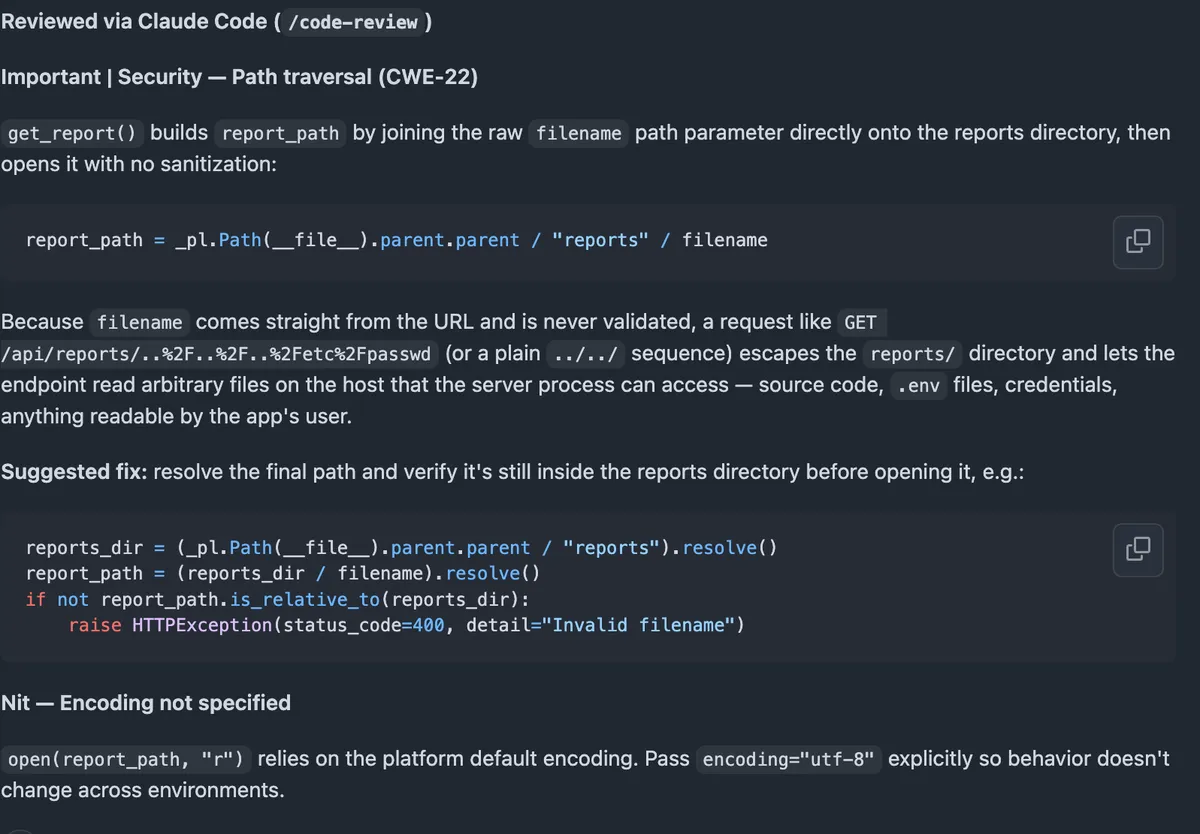
We don’t have Team/Enterprise access to test the automated GitHub bot directly, so instead we used that /code-review capability on a real PR: an endpoint that read a file by an unsanitized filename parameter. It caught a genuine path-traversal vulnerability (CWE-22), explained exactly how it could be exploited, and proposed a fix — plus a smaller nit about an unspecified file encoding.
GitHub Copilot and ChatGPT Codex: review as a bonus feature
If your team already pays for GitHub Copilot, you can assign “Copilot” as a PR reviewer with zero extra setup — it’s bundled into the paid tiers. ChatGPT Codex works similarly for OpenAI-centric teams, auto-reviewing PRs as one capability of a broader coding agent. Both are convenient and cost nothing extra on top of the subscription you have. Neither is built primarily for review, though, so they lag dedicated tools on custom rules, false-positive management, and teaching the reviewer your team’s conventions. Treat them as a useful add-on, not a reason to buy the subscription.
Copilot did close one of those gaps on August 7, when review effort levels went generally available: Lite for straightforward changes, Balanced when a diff warrants a higher-reasoning model. (They’re the preview’s Low and Medium, renamed.) You can set an org-wide default that repositories inherit and still override it per review, on Pro, Pro+, Max, Business, and Enterprise. It’s a real answer to the noise problem — most of what a reviewer flags on a two-line change is noise — and it’s the kind of control the dedicated tools charge for. It doesn’t change the verdict, since depth isn’t the same as knowing your conventions, but it narrows the gap enough to try Copilot’s reviewer properly before you buy a second tool. (For the Copilot side specifically, see our GitHub Copilot review; for what Codex’s local reviewer actually checks, see our guide to code review in the Codex CLI.)
About those accuracy numbers
Here’s the part most roundups won’t tell you. You’ll see confident figures — one tool “catches 82%,” another posts “2 false positives per run,” a third has a “76% resolution rate.” Those numbers get copied from list to list, and they almost never link to a reproducible benchmark you can inspect. Many appear to trace back to a single informal test.
That doesn’t make them useless, but it changes how you should read them. Catch rate and false-positive rate describe a design trade-off, not a fixed grade: a tool tuned for high recall will catch more and flag more junk, and one tuned for precision will do the opposite. The actual numbers swing hard with your language, your codebase, and the kind of PRs you ship. Use the published figures to understand which side of that trade-off a tool sits on — then run a two-week trial on your own repos, because that’s the only benchmark that reflects your code.
How to choose
Work through it in this order:
- Platform first. If you’re not fully on GitHub, your shortlist is basically CodeRabbit, Qodo, or Codacy. This eliminates more options than anything else.
- Noise tolerance. If your team abandons tools that over-comment, favor a precision-biased reviewer (CodeRabbit, Graphite). If missing a bug is the bigger fear and you’ll triage the noise, a full-context reviewer (Greptile) fits.
- Security posture. Need SAST plus AI in one dashboard, or an air-gapped deployment? That points to Codacy or Qodo Enterprise.
- Existing spend. Already paying for Copilot or ChatGPT? Turn on their review first and see if it’s enough before adding a dedicated tool.
- Then trial two or three on real pull requests. Configuration and fit matter more than the leaderboard — a well-tuned second-choice tool beats a poorly-configured “winner.”
For the wider toolchain these plug into, see our comparisons of AI developer tools, including Cursor vs. Claude Code and Claude vs. Codex.
Frequently asked questions
What is the best AI code review tool in 2026?
There's no single winner — it depends on your Git platform and your tolerance for noise. CodeRabbit is the safest all-rounder because it works across GitHub, GitLab, Bitbucket, and Azure DevOps and has a genuinely useful free tier. Greptile indexes your whole repo and tends to catch more, at the cost of more false positives. Claude Code's review runs a fleet of agents in parallel but is Team/Enterprise-only and billed per review. Match the tool to your stack first, then to your budget.
How much do AI code review tools cost?
Most dedicated reviewers land around $15–30 per developer per month for their paid tier, with several offering a free tier for small teams or open-source repos. Claude Code Review is the exception: it's billed by token usage at roughly $15–25 per review rather than a flat monthly seat. Always confirm the current number on the vendor's own pricing page — this category changes its plans often.
Can AI code review replace human reviewers?
Not in 2026. AI reviewers are good at the mechanical layer — spotting logic slips, missed edge cases, and security patterns across a diff — which frees human reviewers to focus on architecture, product intent, and trade-offs a model can't judge. The teams getting value treat it as a fast first pass that clears the backlog, not a replacement for a human approving the merge.
Are the accuracy percentages for these tools reliable?
Treat them as directional, not gospel. The catch-rate and false-positive figures that circulate in roundups (an '82% catch rate,' '2 false positives per run,' a '76% resolution rate,' and so on) almost never link to a reproducible benchmark, and results swing wildly with codebase and PR type. Use them to understand each tool's design trade-off — precision vs. recall — not as a precise score you can bank on.