What GitHub Copilot sends: we ran it through mitmproxy
Everyone writing about GitHub Copilot privacy quotes the same two sources: GitHub’s own documentation, and each other. We wanted the third source — the wire itself. So we put VS Code behind mitmproxy, typed into a file, asked Copilot a question, and counted every byte that left the machine.
Some of what we found is reassuring. Some of it isn’t in any documentation we could find.
Key takeaways
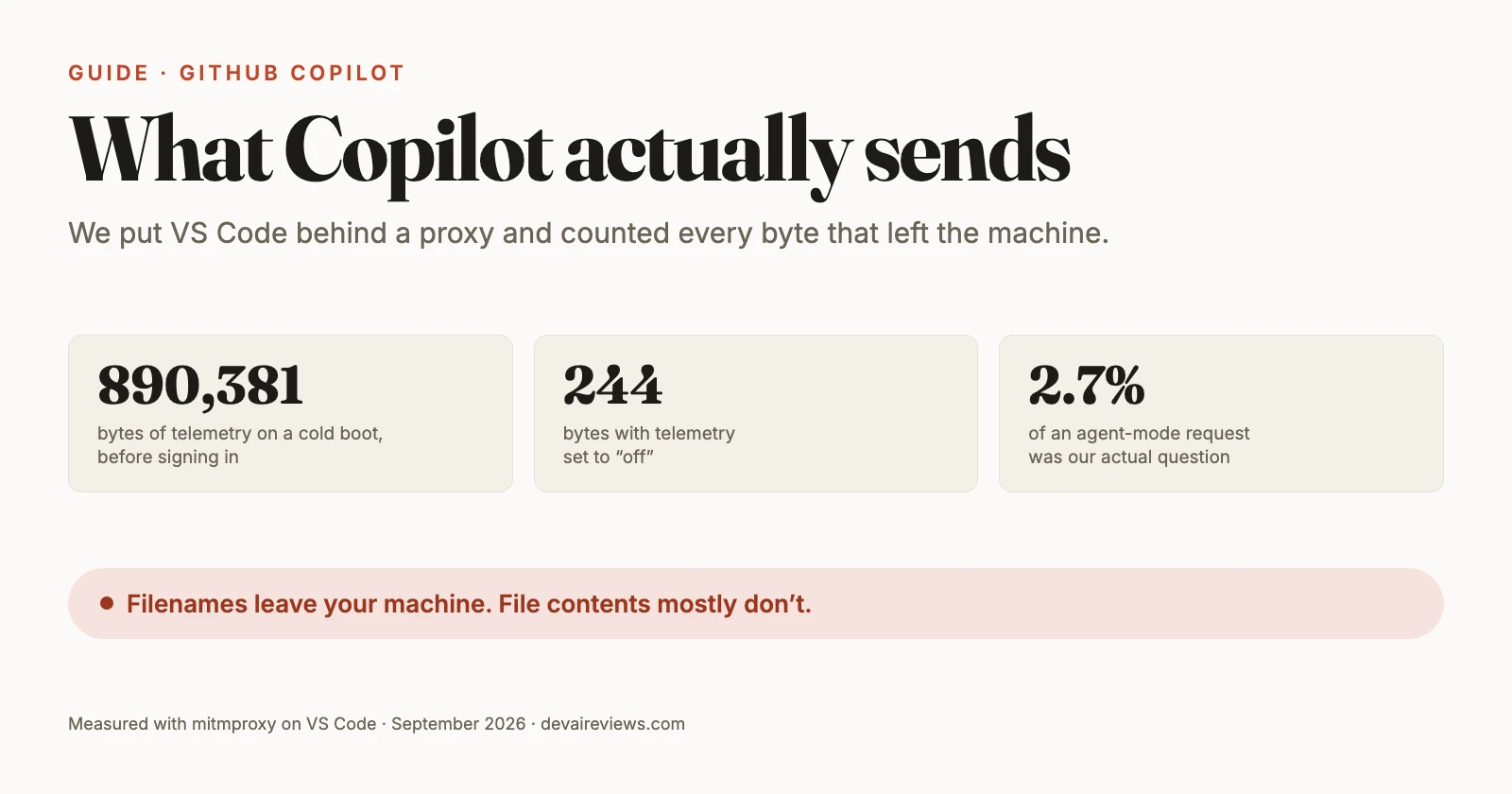
- A cold VS Code boot uploads about 890KB of telemetry before you sign in, open a file, or type a character. 87% of the 314 records in its largest batch are A/B experiment bookkeeping, not data about you.
- Setting
telemetry.telemetryLeveltooffgenuinely works: the same boot drops to 244 bytes. We verified this on the wire, not in the settings UI. - Inline completions send the whole active file, the code below your cursor included, plus your repository’s full name. In our small test file, no other file’s contents travelled.
- Chat requests carry a workspace file listing. In our four-file repo it was complete, including a file we never opened. Contents stayed local.
- One four-word question in agent mode cost 251,709 bytes across 13 requests. In the largest of them, our question and its context were 2.7% of the payload. Ask mode cost a third as much.
How we measured this
We captured all of this on September 1, 2026, running a dedicated VS Code profile through mitmproxy 12.2.3 — an intercepting HTTPS proxy — on macOS 26.6.2 (arm64). Every run used a brand-new profile and an empty extensions directory, so nothing but VS Code’s built-in code was talking.
The whole recipe is four commands, if you want to reproduce it:
brew install mitmproxy
mitmdump -p 8080 -w flows.mitm

# in another shell — note the short path: VS Code's IPC socket
# breaks above 103 characters
"/Applications/Visual Studio Code.app/Contents/MacOS/Code" \
  --user-data-dir=/tmp/cm/profile --extensions-dir=/tmp/cm/ext \
  --proxy-server="http://127.0.0.1:8080" --ignore-certificate-errors \
  /tmp/cm/repo
Setting HTTPS_PROXY alone does nothing here. That cost us a while: Chromium’s network stack ignores it, so the --proxy-server flag is the one that matters.
Two things before any numbers.
First, Copilot Chat now ships bundled: you no longer install it from the Marketplace, and it lives at Contents/Resources/app/extensions/copilot. We found this the hard way, when trying to install it failed with a complaint about downgrading a built-in. VS Code still checks the Marketplace for its updates: the one request that survives with telemetry off.
Second, VS Code updated itself twice while we were measuring, exactly the kind of thing that quietly ruins a benchmark. Our first two boot measurements fired an update:versionChanged telemetry event and uploaded 956,548 and 891,696 bytes; we ran a third boot after the dust settled, and it came in at 890,381. The update wasn’t causing the volume. Copilot Chat went from 0.56.0 to 0.63.0 across those updates, and the telemetry manifest we cite below was byte-identical in both (sha256 e6c905a9…).
All byte counts are request bodies. They exclude headers and TLS overhead, so the real figure on your network is somewhat higher.
What leaves your machine before you sign in?
About 890KB. It’s VS Code’s telemetry, not Copilot’s inference traffic. Almost none of it is about your code.
We booted a fresh VS Code profile, opened a folder, and touched nothing. No sign-in, no typing, no file opened. In a 90-second window it uploaded 890,381 bytes across 11 requests. Essentially all of it went to one host:
| Host | Requests | Bytes uploaded |
|---|---|---|
| mobile.events.data.microsoft.com | 3 | 890,137 |
| marketplace.visualstudio.com | 2 | 244 |
| main.vscode-cdn.net | 3 | 0 |
| update.code.visualstudio.com | 1 | 0 |
That endpoint is worth naming precisely, because write-ups on this topic commonly cite dc.services.visualstudio.com. What we observed was mobile.events.data.microsoft.com/OneCollector/1.0, with the payload identifying itself as SDK 1DS-Web-JS-3.2.13.
The interesting part is what’s inside. That traffic isn’t one giant event — it’s a batch. The largest POST, 860,049 bytes, contained 314 separate records in a newline-delimited JSON stream. And the composition is not what the size suggests:
- 171 ×
tasClientReadTreatmentComplete - 102 ×
query-expfeature - 41 × everything else
So 273 of 314 records, about 87%, are the A/B experiment framework reporting which feature flags it read. If you were expecting 890KB of surveillance, most of it is Microsoft talking to itself about experiment assignments.
The remaining records are more substantive. A second batch carried installedExtensions, workspaceProfileInfo, workspace.stats, workspace.remotes, and — spelled exactly like this in Microsoft’s own event name — workspce.tags. These describe your setup: a stable machineId (a SHA-256 hash), a devDeviceId UUID, a hash of your workspace path, and a workspace.stats.file event declaring which file types your workspace contains.
Does turning off Copilot telemetry actually work?
Yes, and this is the single most useful thing we measured.
Plenty of guides tell you to flip telemetry.telemetryLevel. We couldn’t find one that checked whether flipping it changes what actually goes out. So we ran the identical boot again, same folder and same 90-second window on a fresh profile, changing only that one setting:
| Setting | Requests | Bytes uploaded | Telemetry host contacted? |
|---|---|---|---|
"all" | 11 | 890,381 | Yes — 3 requests |
"off" | 6 | 244 | No |
mobile.events.data.microsoft.com vanished from the capture completely, and so did default.exp-tas.com, the A/B experiment service. What survived was a 244-byte marketplace query checking for updates to github.copilot-chat — byte-for-byte identical in both runs.
We checked that VS Code was actually alive and running for the full window in the telemetry-off case, because “nothing was sent” and “the app crashed” look the same in a packet capture. It was running.
There’s a second source here that we haven’t seen anyone open. VS Code ships a declared telemetry manifest for Copilot at extensions/copilot/telemetry.json. It lists 236 events and 1,561 classified properties, and the classification breakdown is:
- 1,538
SystemMetaData - 20
CallstackOrException - 3
PublicNonPersonalData
Not one property is declared as customer content. That matches what we saw on the wire. The caveat: the 20 exception properties are error messages and stack traces, and one of them — typescript-context-plugin.activation.unknown-ping-response — documents its field as “The response literal.” Stack traces are a well-known way for content to escape incidentally, so “no declared content channel” isn’t the same as “no content can ever leak.”
What does an inline completion actually send?
The whole file you’re editing — in both directions from your cursor — and your repository’s name.
We built a small Python repo with unique marker strings scattered through four files, signed in with a throwaway account, and typed inside a function. Five keystrokes produced five requests to proxy.individual.githubcopilot.com/v1/engines/gpt-41-copilot/completions, each between 834 and 924 bytes.
The payload shape is a prompt field (everything before your cursor), a suffix field (everything after), and metadata:
{
  "prompt": "...", "suffix": "...",
  "max_tokens": 20, "temperature": 0, "top_p": 1, "n": 1,
  "stop": ["\n\n"], "stream": true,
  "extra": {
    "language": "python", "next_indent": 4,
    "prompt_tokens": 139, "suffix_tokens": 37,
    "context": ["Path: payments.py"]
  },
  "nwo": "devaireviews-lab/canary-lab",
  "code_annotations": false
}
Note the scale before reading too much into “whole file”: those five requests were 834 to 924 bytes in total, prompt and suffix together. Our test file was about 700 characters. The payload’s own prompt_tokens: 139 and suffix_tokens: 37 are the shape of a budget, so on a 3,000-line file “the whole file” almost certainly stops being true. We didn’t test that, and you shouldn’t assume it.
Two things stand out. The suffix field means the code below your cursor travels too — a detail that rarely makes it into privacy explainers, which tend to describe Copilot as sending “the code you’re working on” as if that meant the lines above. And nwo carries your repository’s full owner/name, derived from the git remote. That field showed up in John Whitaker’s 2024 teardown of Copilot’s traffic, and it’s still there in 2026.
Our markers settled the scope question cleanly:
| Marker location | Sent? |
|---|---|
| Active file, above the cursor | Yes |
| Active file, below the cursor | Yes |
| A different file in the repo, never opened | No |
| A file with a secrets-shaped name, never opened | No |
| README | No |
One caveat we have to put right next to that table: every one of those other files was closed. We opened payments.py and only payments.py, so we did not test the neighbouring-tabs behaviour at all. GitHub’s own best-practices guide tells you to “open relevant files and close irrelevant files,” advice that only makes sense if open tabs can feed the prompt. Our null result says nothing about that mechanism. It says that four unrelated, closed files in a tiny repo contributed nothing.
Does Copilot send files you never opened?
Their contents, no. Their names, yes — on every chat request.
This is the finding we’d want to know as a working developer. When we asked Copilot a question, the request carried a <workspace_info> block containing the complete file listing of the folder:
I am working in a workspace that has the following structure:
helpers.py
payments.py
README.md
untouched_secrets.md
That last file was never opened in the editor. Its marker string appears in none of the 13 requests we captured, so its contents stayed on the machine. But its name went out, and filenames are not nothing. Think acquisition-q4.md, layoffs-draft.py, client-therapy-notes.md. A directory listing can carry a lot of meaning on its own.

The same message also included an <environment_info> block naming the operating system, three memory blocks (userMemory, sessionMemory, repoMemory, all empty for us), and a list of deferred tools.
What does one chat question cost?
251,709 bytes for four words. In the largest single request, 97% of it is scaffolding.
We asked what does this function do? with nothing attached: no #file, no @workspace. That produced 13 requests totalling 251,709 bytes uploaded. The largest single request was 111,114 bytes, and it breaks down like this:
| Component | Bytes | Share |
|---|---|---|
| 52 tool definitions | 64,670 | 58.2% |
| System prompt | 43,211 | 38.9% |
| Your question and its context | 2,985 | 2.7% |

If that ratio feels familiar, it’s the same shape we measured in Claude Code’s startup token overhead and in Vercel’s fx agent. Harnesses are mostly harness.
The model named in that request was claude-haiku-4.5. Don’t map Copilot’s model strings onto vendor APIs one-to-one: Anthropic’s identifier is claude-haiku-4-5 with hyphens, and the completions engine in the section above is gpt-41-copilot. That’s nobody’s public model name. Copilot runs its own namespace. Copilot also posts to a /auto endpoint, which lines up with the automode.routerDecision event declared in the telemetry manifest: there’s a router picking your model.
The 52 tools are their own story. Alongside the expected file and terminal tools sit runSubagent, a memory tool, session_store_sql, install_extension, and eight browser-automation tools including run_playwright_code, click_element and screenshot_page.
Is agent mode more expensive than ask mode?
Yes — 3.3 times more bytes for exactly the same question.
We repeated the identical prompt in a fresh chat, changing only the mode:
| Measure | Ask | Agent |
|---|---|---|
| Requests | 4 | 13 |
| Total bytes uploaded | 76,383 | 251,709 |
| Tool definitions | 21 (21,104 B) | 52 (64,670 B) |
| System prompt | 42,825 B | 43,211 B |
| Your question | 2,737 B | 2,985 B |
The system prompt is essentially identical in both. The difference is almost entirely the tool list, and the 31 tools agent mode adds are the ones with teeth. Ask mode declared only read-oriented tools: read_file, grep_search, semantic_search, list_dir, get_errors. No create_file, no run_in_terminal, no runSubagent, no browser automation.
That’s a useful mental model for anyone weighing whether Copilot is safe for proprietary code: ask mode declares a capability surface that can read, and agent mode declares one that can write and execute. Even in ask mode, though, your question is only 4.1% of that request.
Does Copilot send your code to a public-code checker?
Yes — to a fourth host we saw no other write-up mention: origin-tracker.individual.githubcopilot.com, receiving a POST to twirp/github.snippy.v1.SnippyAPI/Match.
This is the duplicate-detection machinery — the thing behind the “suggestions matching public code” setting. Its body is simple:
{"source": "<338 characters of the code around the cursor>"}GitHub’s documentation on code referencing states that Copilot “compares potential code suggestions and the surrounding code of about 150 characters against an index of all public repositories on GitHub.com.” What we can say is that a single request carried 338 characters. GitHub’s figure describes only the surrounding-code portion, and the payload doesn’t tell us how those 338 characters split between suggestion and context, so we’re not calling this a contradiction.
The same page carries a note worth quoting in full, because the half people quote is the second half: “Code referencing for inline suggestions only occurs for matches of accepted Copilot suggestions. Code you have written, and Copilot suggestions you have altered, are not checked for matches to public code.”
That first sentence is the key. The note is about what gets logged and surfaced to you, not about what gets transmitted. Our capture is consistent with it: the request fired while typing, carrying freshly written code, without any suggestion being accepted. The check on GitHub’s side may well discard it. The transmission still happened, and if you assumed nothing goes to that index until you accept something, it’s worth knowing.
What we didn’t test
This was one machine, one operating system, one account on the individual tier — the hostnames say individual in them, and Business or Enterprise plans may behave differently. Notably, a mitmproxy discussion thread records Copilot Business refusing the setup with “Your current Copilot license does not support proxy connections with self-signed certificates”; we hit no such block on an individual account, signed in or out.
We also didn’t test a long agent session with real tool calls, a repository large enough to trigger workspace indexing, or the #codebase and @workspace chat participants, which explicitly widen the context and would almost certainly change the file-scope findings above.
And a confession about method: partway through, our own tooling leaked into the capture, 700 bytes of unrelated traffic from a separate process using the same proxy. We spotted it by hostname and excluded it. If you run this experiment yourself, check whose traffic you’re actually counting.
What we’d actually change
Set telemetry.telemetryLevel to off. It’s the only setting we tested that produced a measurable, order-of-magnitude change in what leaves the machine. It doesn’t touch what Copilot sends to answer your prompts, a separate channel, but it removes roughly 890KB per boot of telemetry you get nothing from.
Use ask mode when you only want an answer. Agent mode isn’t wrong, but it declares 31 extra capabilities to the model on every request, including terminal execution and browser control. If you’re asking what a function does, you don’t need that surface open.
Assume your filenames are public and your file contents aren’t. That’s the actual boundary we measured, and it’s more useful than either “Copilot uploads everything” or “Copilot only sees your current file.” Both are wrong in different directions.
This piece sits with our other developer tool guides. If you’re setting Copilot up from scratch, our VS Code setup guide covers the configuration side, and our Copilot review covers whether it’s worth paying for. For the broader question of what any AI coding tool does with proprietary code, we compared the major vendors’ data handling in a separate piece. We ran this same question at a different tool and got there a different way: OpenCode ships its source, so instead of watching the wire we read the code at v1.18.28 to see what a fresh install sends. We did the same with ZCode after Z.ai published its client, and the interesting part there wasn’t the upload code everyone was looking for: it was a gateway that quietly re-sends two model endpoints, authorization header and all.
Frequently asked questions
Does GitHub Copilot send your entire codebase?
Not in our test. We planted unique marker strings in four files of a small repo and watched the wire. On an inline completion, the whole active file travelled — the code above the cursor and the code below it — and no marker from any other file appeared in any request we captured. What did travel is the list of filenames: every chat request carried the workspace file listing, including a file we never opened. Our repo was tiny and the files unrelated, so this does not rule out the cross-file context GitHub's own guidance implies exists.
Does turning off Copilot telemetry actually do anything?
Yes. This is the one setting we found that measurably changes what leaves your machine. With telemetry.telemetryLevel set to 'all', a cold VS Code boot uploaded 890,381 bytes before we typed anything and before signing in. With the same setting at 'off', an identical boot uploaded 244 bytes — a single marketplace lookup. The telemetry host disappeared from the capture entirely.
How much data does one Copilot chat request send?
Far more than your question. A four-word prompt in agent mode produced 13 requests totalling 251,709 bytes uploaded. In the largest single request, the 52 tool definitions took 64,670 bytes and the system prompt took 43,211, while the message carrying our actual question and its context was 2,985 bytes — about 2.7% of that request.
Is Copilot agent mode more expensive than ask mode?
In bytes on the wire, yes: 3.3 times more for the same question in our test. Ask mode sent 76,383 bytes across 4 requests and declared 21 tools; agent mode sent 251,709 bytes across 13 requests and declared 52. The 31 extra tools are the ones that write and execute — file creation, terminal commands, subagents, and browser automation. Ask mode declared only read-oriented tools.