Last updated on
Is GitHub Copilot safe? Privacy and code security explained
“Safe” depends on what you’re worried about. GitHub Copilot won’t ship backdoors into your codebase. What it will do is send your code to GitHub’s servers to generate suggestions, and the privacy model differs sharply between individual and enterprise accounts.
Here’s what the tool actually does with your code.
What Copilot sends to GitHub’s servers
When you use GitHub Copilot, the code in your active editor session is sent to GitHub’s servers to generate suggestions. This includes:
- The current file you’re editing (or a portion of it, depending on context window)
- Related files that Copilot pulls for context
- Your editor configuration and the prompt you’ve typed
This happens in real time as you type. There’s no local-only mode for code suggestions. The model runs on GitHub’s infrastructure, not on your machine.
We later put this to the test on the wire. In our mitmproxy capture of Copilot’s traffic, an inline completion carried the whole active file and nothing from the other files in the repo, while every chat request carried the full workspace file listing — names included, contents not. All four of those other files were closed during the test, so that measurement doesn’t rule out the related-file context above; it does put a boundary on what we could actually observe.
What GitHub does (and doesn’t) store
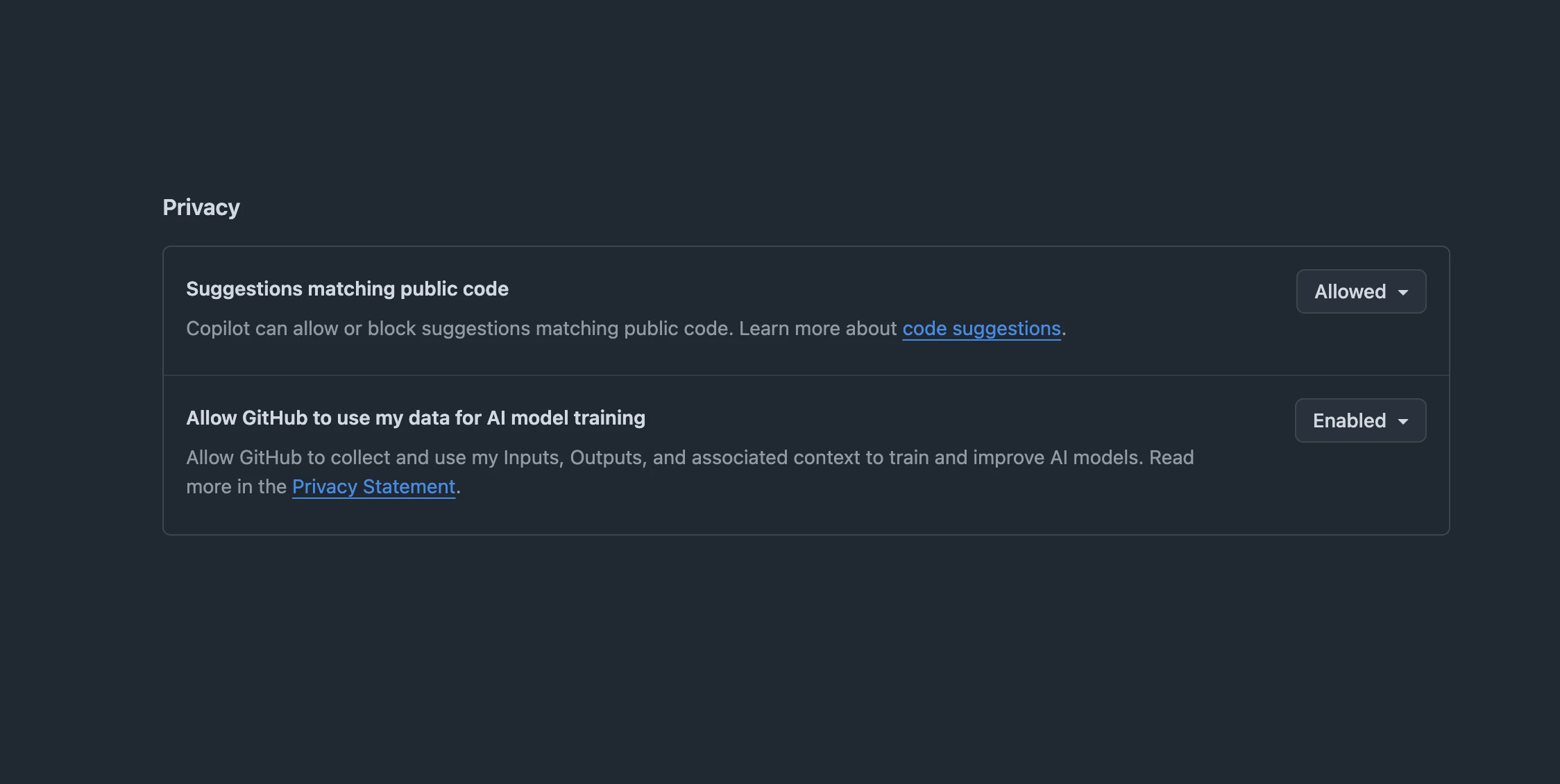
For individual accounts (Copilot Free, Pro, and Pro+): since an April 24, 2026 policy update, GitHub uses your interaction data — prompts, suggestions, and the code context around them — to train and improve its AI models by default. You can opt out under Privacy in your Copilot settings; any opt-out you’d already set is preserved. This doesn’t cover private repository content sitting at rest — GitHub doesn’t train on code in a private repo you’re not actively using Copilot in — but it does cover the prompts and code context Copilot generates while you’re working, including inside private repos, unless you opt out.
For Copilot Business and Enterprise accounts: Code snippets are not retained by default, and telemetry data is not used to train models. Enterprise accounts also get audit logs, policy controls, and the ability to restrict which Copilot features employees can use. (Current verified per-seat prices for both plans are in our Copilot pricing tracker.)
The short version: enterprise plans have stronger data protections by default; individual plans require opting out of training data collection.
Does Copilot suggest other people’s code?
Sometimes — and GitHub built a filter for it. Because Copilot is trained on public repositories, a suggestion can occasionally match an existing public snippet closely enough to raise licensing or attribution concerns, separate from the security question.
GitHub’s duplication detection filter checks suggestions, and the code around them, against public code on GitHub in real time; GitHub’s docs describe the surrounding code as “about 150 characters.” (When we captured that request, its body carried 338 characters, though the payload doesn’t reveal how much of that was the suggestion itself.) Individual users can turn it on in their personal Copilot settings; Business and Enterprise admins can enforce it org-wide. When it’s on, Copilot suppresses matching suggestions and shows you the public source instead. One limit: as of GitHub’s current documentation, the filter doesn’t cover the separate Copilot coding agent.
If license provenance matters as much as security to your team, turn this on — it’s off by default for individual accounts.

The code suggestion risk
The more discussed security concern with Copilot isn’t data storage — it’s the suggestions themselves.
Copilot is trained on public code, which includes code with security vulnerabilities. It can suggest, and sometimes does suggest, insecure patterns: SQL injection vectors, hardcoded credentials, missing input validation, deprecated cryptography functions. This isn’t Copilot being malicious; it’s pattern-matching on what exists in its training data.
A Stanford study (Perry et al., 2023) found that participants with access to an AI coding assistant wrote less secure code than those without one, and were more likely to believe their code was secure regardless. GitHub has since added filters and vulnerability detection, but the fundamental issue remains: the model suggests what looks plausible, not what’s secure.
The practical response: treat Copilot suggestions with the same scrutiny you’d give code from any source. Don’t accept a suggestion involving authentication, authorization, database queries, or file operations without reading it.
Copilot in regulated environments
For teams in regulated industries (healthcare, finance, government), the questions to answer before deploying Copilot are:
- Where is data processed? Copilot’s infrastructure runs on Microsoft Azure, but the model that actually generates your suggestion depends on your plan — Copilot now routes requests to Claude, Gemini, or GPT-5 models depending on what you pick (see our breakdown of what each Copilot plan unlocks). GitHub Copilot Enterprise can be deployed with data residency constraints for some regions — verify current availability with GitHub.
- Does it meet UK/EU data protection rules? For UK GDPR or EU GDPR purposes, sending code to GitHub’s servers is a transfer to a data processor. Review GitHub’s current Data Protection Agreement and data-processing terms with your DPO before rolling Copilot out to teams handling regulated personal data.
- What counts as “code”? If your source code contains personally identifiable information (PII), API keys, or other sensitive data inline, sending it to GitHub’s servers is a data handling decision, not just a developer tool decision.
- Compliance certifications: Copilot Business and Enterprise are covered under GitHub’s SOC 2 Type II report and its ISO 27001 certification scope. Reports cover a specific time period and get renewed, so verify the current report and scope against your compliance requirements before deployment.
The safest configuration for regulated teams is Copilot Enterprise with telemetry disabled, combined with a policy that prohibits committing PII or secrets to source code (which should be policy regardless of AI tools).
How Copilot compares on privacy
Tabnine offers on-premise deployment and a zero-data-retention model as the core product pitch, not an enterprise add-on. If keeping code off third-party servers entirely is the requirement, Tabnine is worth evaluating.
Aider with a self-hosted model via Ollama keeps everything local — no data leaves your machine. The tradeoff is model capability: local models are less capable than frontier models.
Amazon Q Developer runs on AWS infrastructure with enterprise data controls similar to Copilot Enterprise — relevant if your team is already on AWS and within AWS’s compliance boundaries. Note that it’s no longer an option for new teams: AWS closed signups in May 2026 and the IDE plugins reach end of support in April 2027, with Kiro as the replacement.
The practical verdict
For most developers and teams: GitHub Copilot’s data practices are comparable to other SaaS developer tools. You’re trusting GitHub with your code the same way you trust it with your git history.
The steps worth taking regardless of plan:
- Opt out of training data collection if you’re on an individual plan
- Add a
.gitignoreand pre-commit hooks to prevent secrets from entering your codebase - Review Copilot suggestions in security-sensitive code paths with the same rigor you’d apply to any third-party code
For teams with strict regulatory requirements: evaluate Copilot Enterprise with your compliance team, and keep Tabnine or self-hosted Aider as the alternative if data residency or zero-retention requirements can’t be met.
See also: AI coding assistants guide · Cursor vs GitHub Copilot · Our other developer guides
Frequently asked questions
Is GitHub Copilot safe to use?
For most developers, yes — its data practices are comparable to other SaaS developer tools, and it won't ship backdoors into your code. The two things to understand: it sends the code in your active session to GitHub's servers to generate suggestions, and it can suggest insecure patterns, so security-sensitive code needs review. The privacy model also differs between individual and enterprise accounts.
Does GitHub Copilot store or train on my code?
It depends on your plan. Since an April 24, 2026 policy change, Copilot Free, Pro, and Pro+ use your interaction data — prompts, suggestions, and code context — to train AI models by default; you can opt out under Privacy in your Copilot settings. On Copilot Business and Enterprise, interaction data isn't used to train models and code snippets aren't retained by default.
Can GitHub Copilot write insecure code?
Yes. It's trained on public code that includes vulnerabilities, so it can suggest insecure patterns — SQL injection vectors, hardcoded credentials, missing input validation. A much-cited Stanford study found people using an AI assistant sometimes produced less secure code. Treat suggestions like code from any source: read anything touching authentication, database queries, or file operations before accepting it.
Is GitHub Copilot safe for regulated industries?
It can be, with the right setup. The safest configuration is Copilot Enterprise with telemetry disabled, plus a policy against committing PII or secrets to source. Copilot Business and Enterprise are covered under GitHub's SOC 2 Type II report, and Enterprise offers data-residency options in some regions — but compliance reports are time-bound and scope can change, so verify the current report and availability with your compliance team before relying on it. Tabnine (on-prem) or self-hosted Aider are alternatives if zero-retention or data-residency rules can't be met.
Can GitHub Copilot suggest someone else's code?
Occasionally, yes — it's trained on public repositories, so a suggestion can closely match existing public code. GitHub's duplication detection filter checks suggestions against public code on GitHub and can suppress matches or show you the source; individual users can enable it in their Copilot settings, and Business/Enterprise admins can enforce it org-wide. It doesn't currently cover the separate Copilot coding agent.