Last updated on
Loop engineering: how self-correcting AI agents work
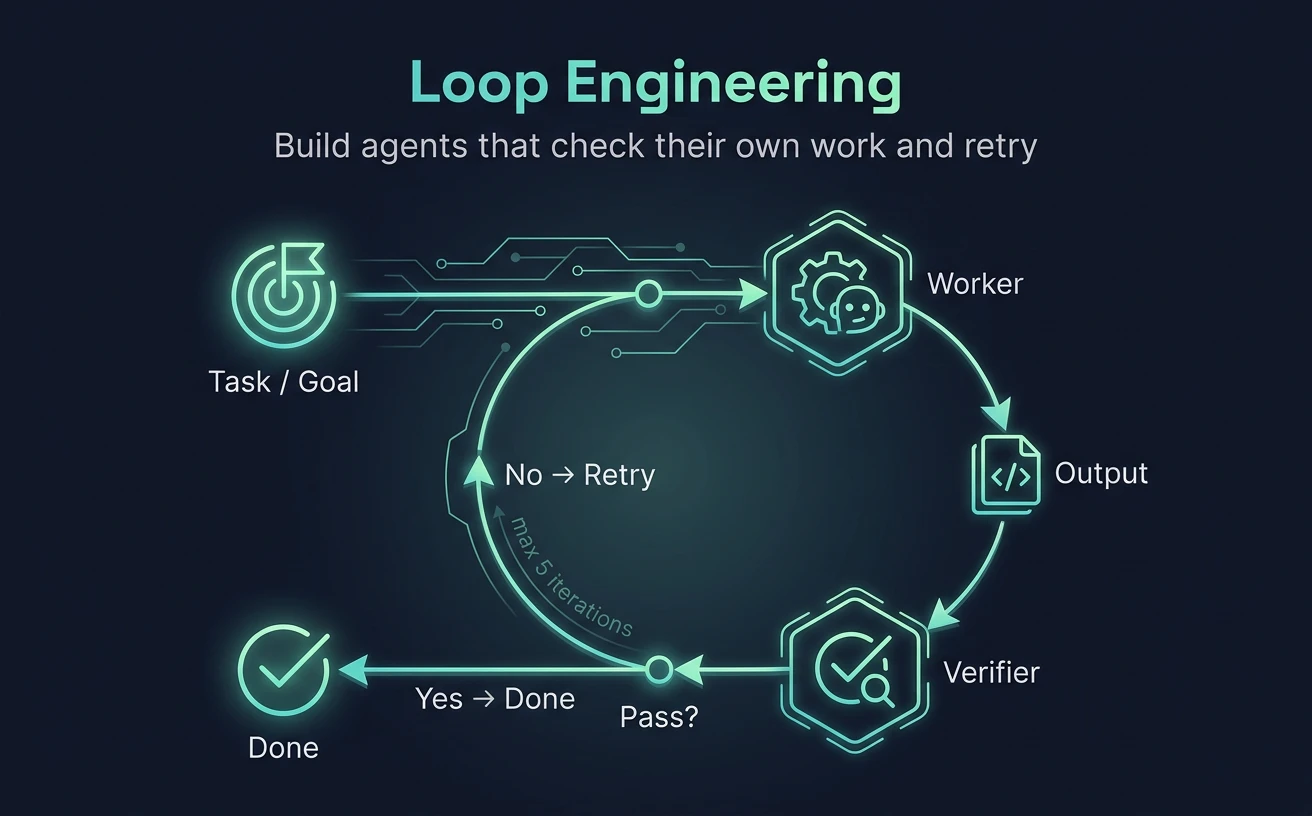
Loop engineering is the practice of building AI systems that don’t just answer a prompt once. They act, check the result against a defined success condition, and correct themselves — repeating that cycle until the goal is met or a stop condition fires. One-shot prompting still works for short, low-stakes tasks. For anything that needs to actually be correct — a passing test suite, a working refactor, a clean draft — the model needs a way to catch its own mistakes before they reach you.
The piece that makes or breaks a loop is the verifier: the thing that decides whether the last attempt succeeded. Get that wrong and you’ve built an expensive way to be confidently wrong, faster.
What loop engineering actually is
A loop is the discipline of designing, tuning, and supervising an iterative workflow where an AI system performs an action, evaluates the output against a defined criterion, and adjusts its next step — without a human approving each individual step — until a stop condition is reached.
It isn’t the same thing as a for or while loop in regular code. A classic loop is deterministic: same input, same path, every time. A model is probabilistic. The engineer’s job is to hand it real tools — a terminal, an API, a browser, a test runner — plus a structured way to judge whether its own output is good enough to stop.
It’s also a different job than prompt engineering, even though the two get conflated:
| Dimension | Prompt engineering | Loop engineering |
|---|---|---|
| Primary focus | Crafting the initial instruction | Designing the loop architecture and the evaluation step |
| Execution mode | One-shot, or manual step-by-step | Autonomous, iterative, until the goal is met |
| Error handling | A human spots the error and re-prompts | The system detects its own errors via a verifier |
| Task complexity | Short text, simple functions | Repo-wide refactors, multi-stage audits |
| Human’s role | Author and step-by-step supervisor | Goal designer and final approver |
Prompt engineering doesn’t go away here — it gets absorbed. You still need sharp instructions — one set for the worker, a separate set for the verifier. The craft shifts from “write a good chat message” to “specify the modules of a system precisely enough that it can grade itself.”
The four stages of an AI loop
Every agentic loop reduces to the same cycle:
- Plan — the model breaks the goal into smaller steps.
- Act — it uses tools: writes a file, runs a command, queries an API, browses a page.
- Verify — a validator (a script, a test run, or a separate model call) judges the result.
- Pivot or stop — on failure, it revises the plan and loops again; on success, it ends.
Making that reliable instead of an expensive way to spin in circles takes five components.
The goal
Not a vague instruction — a measurable target.
- Weak: “Improve my website’s performance.”
- Strong: “Optimize the assets and scripts in this project until the Lighthouse mobile score is above 90.”
The act/plan module
The agent’s ability to propose steps and call tools. Tool access is the agent’s body — bash, APIs, a sandboxed execution environment, file read/write. Without it, the model can describe work, not do it.
The verifier
There’s no loop without one — just automation that happens to be confident. The verifier decides pass or fail. It can be a compiler, a test suite, a linter, a schema check, or a second model call dedicated to critique.
Most of the engineering effort in a reliable loop goes into the verifier, not the generator. A mediocre verifier waves through a broken solution, and every later iteration inherits that mistake. Prefer deterministic checks — code, tests, schemas — over a model judging itself, wherever the success criterion can actually be expressed in code.
State and memory
A loop needs a record of what’s already failed, or it repeats the same dead end. If “strategy A” got rejected by the verifier with a specific error, the next iteration’s context needs to carry that forward so it tries something different, not A again.
Stop conditions
The safety switches. A loop halts for one of three reasons:
- Success — the verifier’s criteria are met.
- Resource limit — a hard cap on iterations, tokens, or budget, so a logic bug in the verifier can’t run up an open-ended bill.
- Critical failure — the environment hits an error that genuinely needs a human (a missing credential, a destructive action it won’t take without sign-off).
Why this is everywhere in 2026
Two things had to happen first: models got reliably good at multi-step reasoning, and terminal-grade agentic tooling went mainstream.
Claude Code — built at Anthropic by a team led by Boris Cherny — is the clearest example of the category in a coding context: point it at a goal and it runs the loop end to end, reading output, patching, re-checking, and stopping only when a real verifier is satisfied.
We ran one ourselves to watch the loop behave. The target was a single-slab bin packer — a GuillotinePacker class — in a 2D stone-nesting project that had no tests at all. Instead of asking for a one-shot fix, we handed Claude Code a loop: write a deterministic verifier first, then improve the packer until every check passes, capped at five iterations, with one rule — don’t weaken a test just to make it pass.
It started by building the verifier: a ~250-line test_packer.py with eight checks across five categories — empty input, oversized-piece rejection, multi-slab conservation, exact-tile zero-waste, geometric overlap/bounds verification, an 80% packing-density floor, and a 500-piece performance budget. Iteration 1 passed seven of the eight. The one that failed was performance: packing 500 pieces took 2.17s against a 2-second budget.
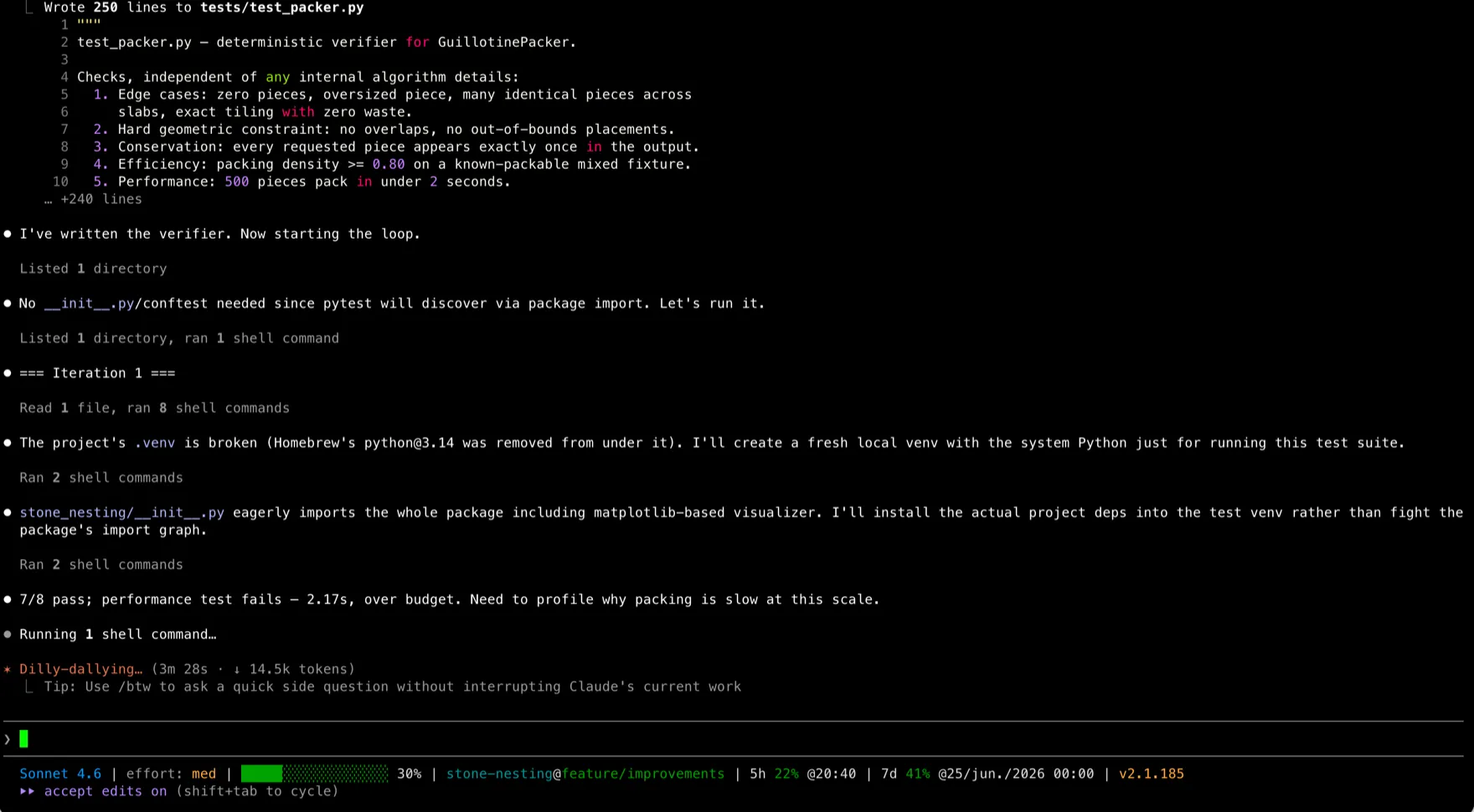
That failure is the whole argument for a deterministic verifier. The code was correct — it just wasn’t fast enough. A model grading its own work would have shrugged and shipped it; a hard number couldn’t be talked past. So the loop profiled before patching, and found the culprit: _merge_free_rects ran an O(n²) all-pairs scan of the free-rectangle list after every placement — roughly 0.2 million merge calls for 500 pieces, eating 3.0 of 3.07 profiled seconds.
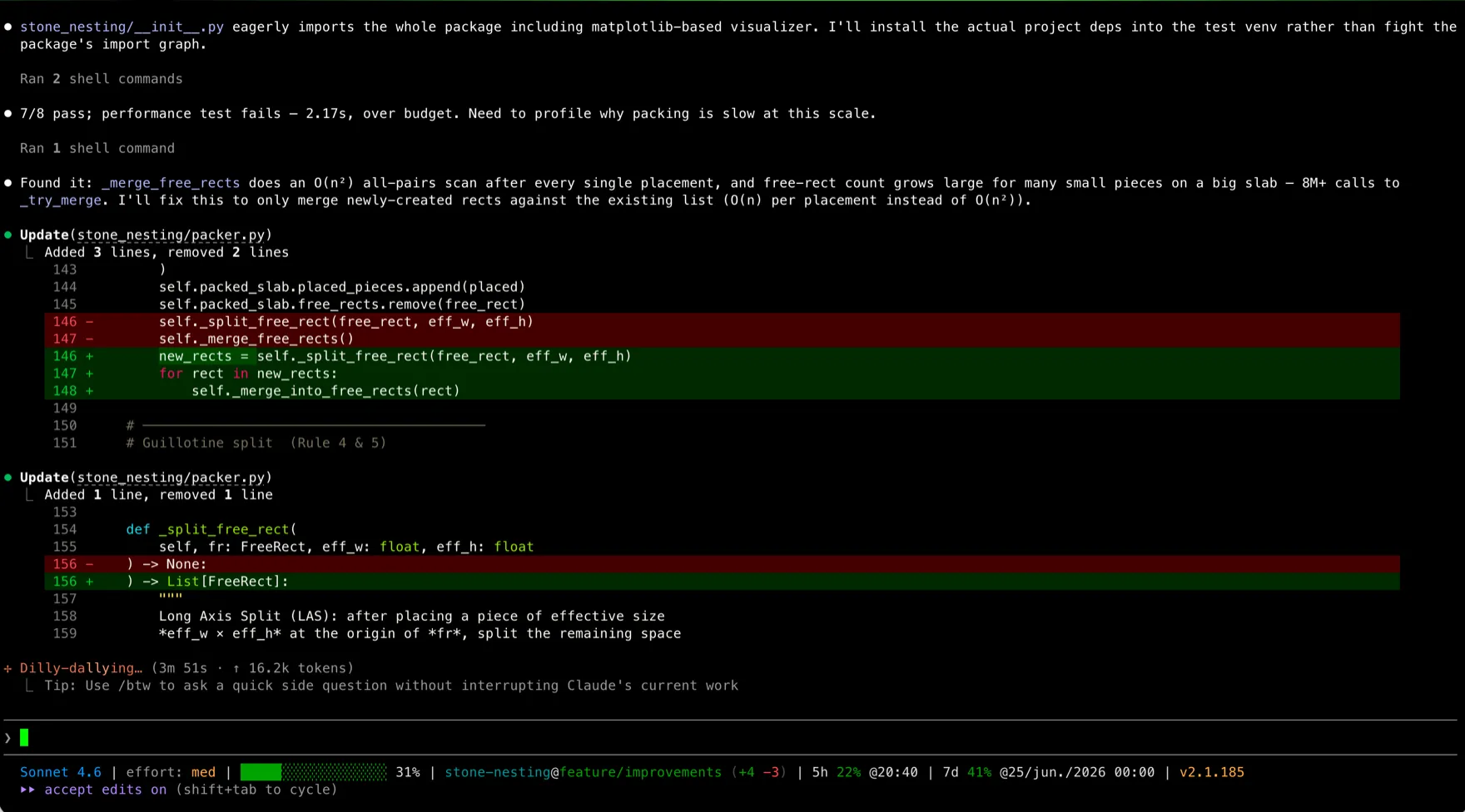
Iteration 2 replaced that with a localized merge that only checks newly-created rectangles against the existing list — O(n) per placement instead of O(n²). All eight checks passed, and the full suite ran in 0.31s, down from 2.17.
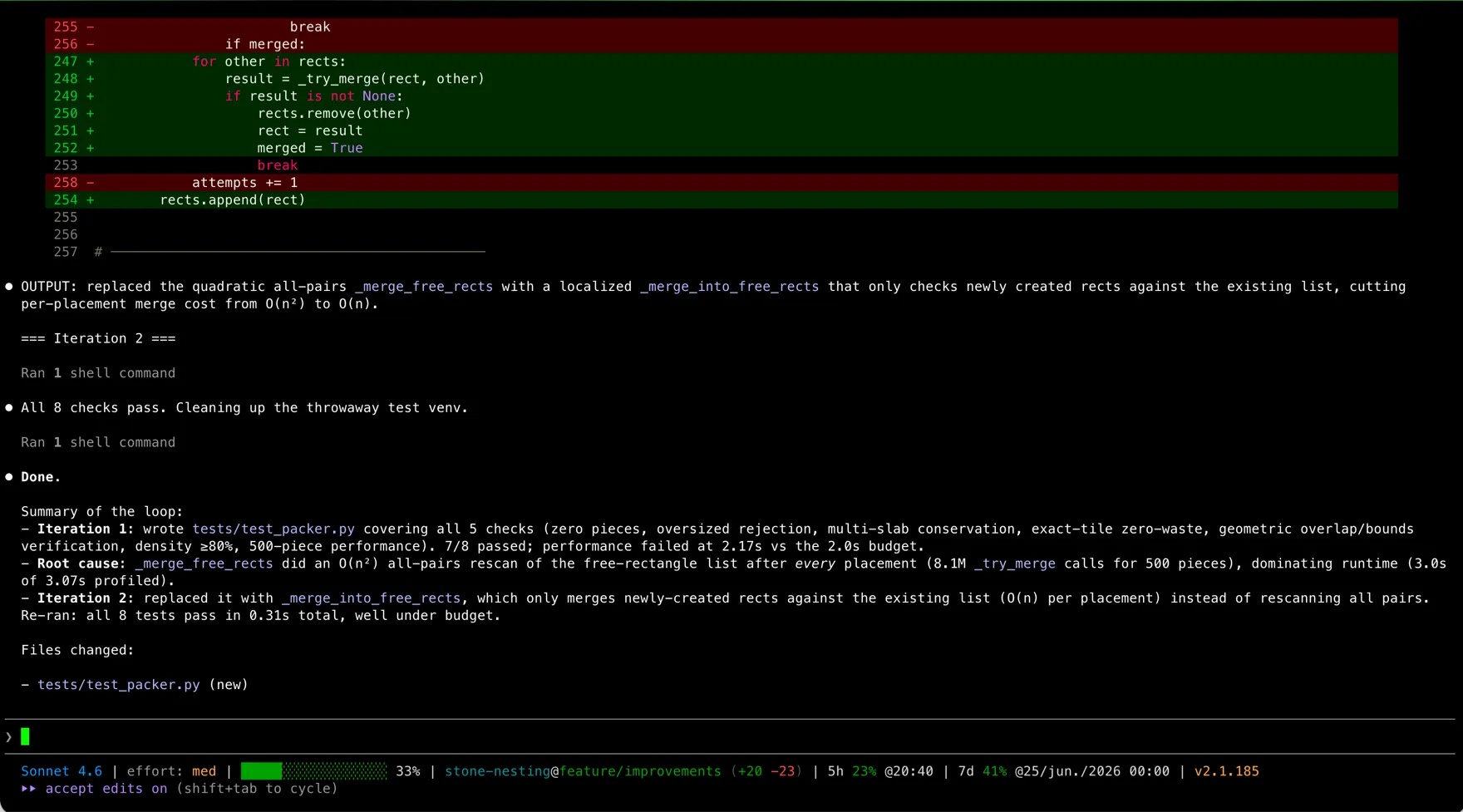
Two iterations, one real failure caught by a check the model couldn’t argue with, fixed without anyone approving each step. That’s the payoff: the verifier did the judging, and we read a finished result instead of supervising a chat. Scale that up and the wins are concrete — refactors that used to take a day resolve in minutes of compute, the work that reaches a human has already cleared several quality gates, and you can run several loops against several problems in parallel.
None of that is free, and the failure modes are real — more on that below.
Build your first loop
You don’t need an orchestration framework to start. A loop this simple runs fine inside Claude Projects, a custom GPT, or an IDE chat — before you ever touch code.
Here’s one for self-correcting content drafting: the model writes, grades its own draft against a checklist, rewrites whatever fails, and only hands back the result once everything passes.
The system prompt
You are an agentic system structured as a closed loop, specialized in
high-quality content drafts. Produce a finished piece by following a
strict self-evaluation cycle.

[GOAL]
Write a draft on the topic the user provides that satisfies every item
in the verification checklist below.

[ACTION MODULE]
1. PLAN: produce an outline.
2. EXECUTE: write the full draft from the outline.
3. VERIFY: check your own text against the VERIFICATION CHECKLIST.
4. CORRECT: if any item fails, rewrite the affected sections and return to step 3.
5. STOP: deliver the final draft only once every item passes.

[VERIFICATION CHECKLIST]
- Does the opening state the answer or takeaway directly, with no throat-clearing?
- Is every claim either generic knowledge or attributed to a source?
- Are headings specific questions or statements, not vague labels?
- Is the text free of filler phrases ("in today's landscape", "it's worth noting", "in conclusion")?

[STATE-CONTROL]
On each iteration, report:
- Iteration #: [X]
- State: [Planning / Writing / Verifying / Correcting]
- Verifier report: [which checks pass, which failed and why]
Drop a topic in and watch it run: iteration 1 produces a draft, the model’s own verifier scans it, catches a filler phrase, fails the check, and iteration 2 rewrites just that section before re-scanning. Once everything passes, it stops.
The design move that makes this work is keeping generate and verify as separate roles, even when one model plays both. That separation is what stops the model from rubber-stamping its own mistake.
Tools worth knowing
| Tool | What it actually is | Best for |
|---|---|---|
| Claude Code | Terminal/IDE coding agent running real act-verify loops against your repo | Refactoring, autonomous QA, full-repo debugging |
| Cursor | AI-native IDE with inline agent loops | Day-to-day coding with tight correction cycles |
| OpenAI Agents SDK / Codex CLI | SDK and CLI for building tool-using agent loops | Custom agents and coding outside an IDE |
| LangGraph | Graph-based framework for stateful, branching agent workflows | Complex, multi-path enterprise systems |
| CrewAI | Multi-agent orchestration framework | Role-based teams of agents collaborating on one goal |
| Mira Network | A decentralized, crypto-economic verification layer that uses multi-model consensus to flag unreliable AI outputs | Teams already in the Web3 stack who want token-incentivized, consensus-based verification |
That last row is worth a flag: Mira is a real project, built on Coinbase’s Base network, where independent model “votes” plus a staking mechanism decide whether an output is trustworthy. It’s adjacent to loop engineering — verification is the same underlying problem — but it’s a blockchain product with its own token, not a coding tool, and most teams building dev-focused loops will never touch it.
One project worth watching separately is Nous Research’s Hermes Agent, which claims something none of the tools above do: a learning loop built into the agent itself, so the loop is meant to close on its own. We read the source to find the three mechanisms behind that claim, their defaults, and what each costs per turn. It’s a self-hosted general operator rather than a coding tool — which is precisely why the machinery is readable instead of hidden behind a vendor’s API.
For a closer look at how a coding-focused agent actually runs this loop in practice, see our Cursor vs Claude Code comparison and our hands-on Claude Fable 5 review. If you’re newer to these tools, start with our guide to AI coding assistants, and browse the rest of our developer guides for more.
When to use a loop, and when not to
Good fits
- Objective, checkable outcomes. Code compiles, JSON validates, a test suite passes, a link resolves.
- High-complexity, multi-step work. Research, drafting, consolidation across many sources.
- Async tasks. Anything you can kick off and review later instead of watching live.
Poor fits
- Purely subjective work. A loop can spin forever trying to “improve the tone” because aesthetic quality has no binary pass/fail.
- Low-latency, real-time replies. A chatbot that has to answer in under two seconds can’t afford four internal correction passes.
- Tight budgets. Every iteration costs tokens on top of the one-shot baseline; a five-iteration loop is meaningfully more expensive than a single call.
Two failure modes to design against
- Infinite loops. If the verifier demands something the generator can’t produce, the system spins forever, spending money the whole time. Set a hard iteration cap — 5 is a reasonable default — in the orchestration layer, not just as a suggestion in the prompt.
- Silent failures. The verifier itself approves a wrong answer. The fix is the same one from earlier: prefer deterministic, code-based checks over a model grading itself whenever the criterion can be written as code.
Common mistakes
- Letting one prompt generate and verify in the same breath. Confirmation bias means the model overlooks its own error. Separate the roles — one call to generate, an independent call (often a smaller, cheaper model) to verify.
- Not bounding context history. In a long-running loop the transcript balloons; feeding every failed attempt back verbatim eats the context window and confuses the model. Summarize state instead: pass forward only what failed and why.
- Skipping logs. When a loop fails after eight attempts, you need to know what happened on attempt three. Print a readable log of each cycle — inputs, outputs, and the verifier’s verdict — every time.
The takeaway
Loop engineering is the point where a model stops being a clever autocomplete and starts being a dependable automation primitive. The gap between teams shipping with AI and teams still copy-pasting from a chat window is mostly this: whether the system checks its own work before a human ever sees it.
Start small. Pick one repetitive task that already has a quality check attached to it — a test suite, a linter, a checklist — wire up a worker/verifier loop around it, and watch where it actually saves you time before reaching for a heavier framework.
Frequently asked questions
Does loop engineering replace prompt engineering?
No, it absorbs it. A loop still needs a sharp prompt for the worker and a separate, equally sharp prompt for the verifier. The skill shifts from writing one good instruction to specifying both halves of a system.
How do I stop a loop from running forever?
Set a hard iteration cap (5 is a common default) in the system prompt or the orchestration code, plus a token or cost ceiling. Without a stop condition, a verifier that can't be satisfied just spins.
Can I build a loop in the ChatGPT or Claude web UI, without a framework?
Yes, for text tasks. A system prompt that gives the model a checklist and tells it to grade and rewrite its own output before replying will simulate the loop. For loops that need to touch your filesystem or run tests, you need a tool-using agent like Claude Code instead.
Which verifiers are most reliable?
Deterministic ones: a compiler, a test suite, a linter, a schema check. A model grading its own work is useful when no deterministic check exists, but it can rubber-stamp a wrong answer, so use it as a fallback, not a default.